
A virtual private network (VPN) encrypts the traffic between your device and a provider's server, and replaces your IP address with the server's. That's the pitch nearly every provider makes, which is why choosing one means looking past the marketing.
Start with the fundamentals: how the company handles your data, how fast it connects in the locations you need, which of your devices it supports, and what it costs once the introductory price expires. Then consider how you'll actually use it. A VPN for streaming abroad needs different strengths than one protecting your laptop on hotel Wi-Fi.
What should you look for when choosing a VPN?
Look at how a VPN handles your privacy and security, how fast it performs, which devices it supports, how easy it is to use and what it costs. Streaming needs speed while privacy needs a clear no-logs policy.
- A provider's logging policy and independent audits may tell you more about privacy than its marketing claims.
- Your main use, such as streaming, gaming or travel, can help you decide which features to prioritize.
- Look for modern protocols with a kill switch and DNS leak protection as basic security standards.
- Compare real-world performance and useful server locations rather than advertised server numbers alone.
- Compare the full subscription cost, including renewal prices, rather than the advertised monthly rate.
- Test any VPN on your own devices and networks during a free trial or refund period.
Which VPN features matter for your needs?
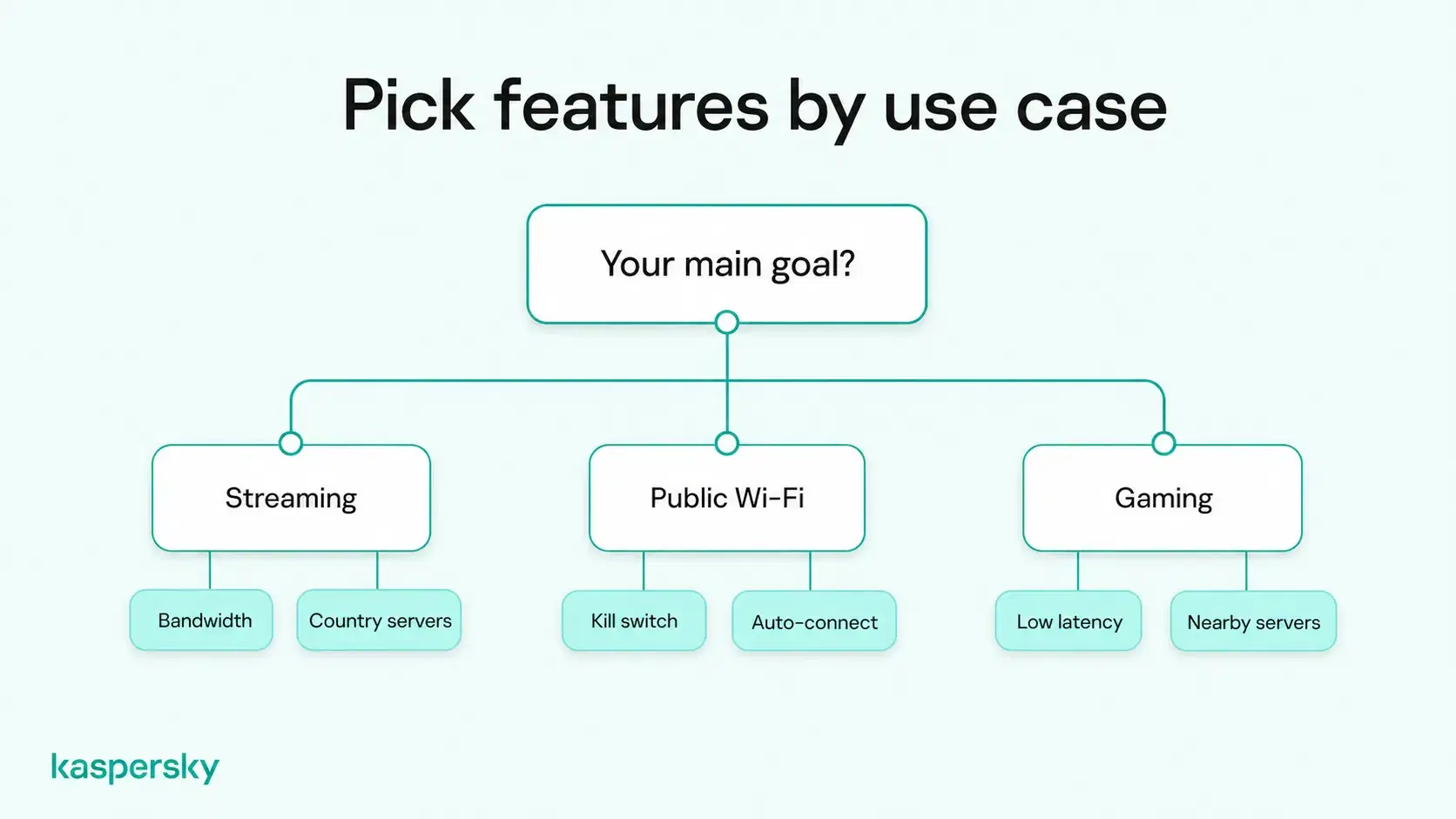
Think about what you'll mainly use a VPN for, such as streaming, gaming or staying private on public Wi-Fi. The table below shows which features are often the most important for each use.
|
Use case |
What to prioritize |
Why it matters |
|
Privacy on public Wi-Fi |
Strong encryption, a kill switch, automatic connection on untrusted networks |
A VPN adds an encrypted tunnel for your internet traffic on networks you don't control, while a kill switch helps prevent traffic from leaving that tunnel if the VPN disconnects |
|
Streaming |
Stable bandwidth, servers in the countries whose catalogs you watch |
Video may buffer when bandwidth dips, and some streaming services block IP addresses linked to VPNs |
|
Gaming |
Low latency (ping), stable performance, and good server coverage in relevant regions |
High ping can delay your moves reaching the game server, which you’ll experience as lag |
|
P2P and torrenting |
P2P-friendly servers, a kill switch, a clear no-logs policy |
Other users sharing the same file may see your real IP address if the VPN drops |
|
Travel and restricted networks |
Obfuscation, a choice of VPN protocols, servers outside the country you're visiting |
Some hotel, school and national networks may detect and block VPN traffic |
|
Multiple devices |
Apps for each platform you own, enough simultaneous connections for all your devices, router support |
Any device not connected to the VPN goes online without the protection it offers |
Which additional VPN features are worth considering?
It’s likely that you won't need every extra feature a VPN offers. But the ones below can all help in a specific situation, so look for the ones that match how you use the internet.
- Split tunneling: This lets you choose which apps use the VPN and which connect directly. It can help when a banking app refuses connections from VPN IP addresses, or when you want local content on your TV while your browser stays on the VPN.
- Obfuscation: This disguises VPN traffic as ordinary encrypted web traffic. It may help on networks that block VPN connections. If you travel, check before you leave whether the VPN works reliably at your destination and whether local law restricts VPN use. Install and sign in before departure, since app stores and provider websites may be blocked once you arrive.
- Dedicated IP address: An IP address that only you use can cut down on CAPTCHAs and blocks from sites that distrust shared VPN addresses. It can also help with work systems that only accept known addresses. The trade-off is privacy, because activity from a fixed address may be easier to tie back to one person.
- Automatic connection: The app can turn the VPN on when your device starts or joins a Wi-Fi network you haven't marked as trusted. This means you don’t have to remember to connect at the airport or coffee shop.
- Specialized servers: Some providers tune particular servers for streaming or P2P traffic. These may help if streaming or file sharing is your main reason for using a VPN.
Kaspersky VPN includes split tunneling, so you can pick which apps bypass the VPN tunnel. Its apps can also be set to switch the VPN on automatically when you connect to an unsecured Wi-Fi network.
What privacy and security features should you look for in a VPN?
Using a VPN shifts some visibility and trust from your internet service provider to the VPN provider, so your privacy depends on both the technology and the company behind it. Look for claims you can verify rather than vague phrases such as "military-grade encryption”.
What should you check in a VPN's privacy and logging policy?
A no-logs policy means the provider doesn't keep records of what you do online while connected. The phrase has no legal definition, though, so read the privacy policy itself.
Part of learning how to choose a VPN provider is checking which of these data types it says it collects:
- Account data: Your email address and payment details. Almost every paid service needs these to run your subscription.
- Connection data: Timestamps, session length, bandwidth used, your real IP address and the server you connected to. Taken together, these records could link a session back to you.
- Diagnostic data: Crash reports and app performance statistics. Look for an option to switch these off.
- Activity data: The websites you visit, your DNS requests and the content of your traffic. A provider that claims not to log shouldn’t collect this.
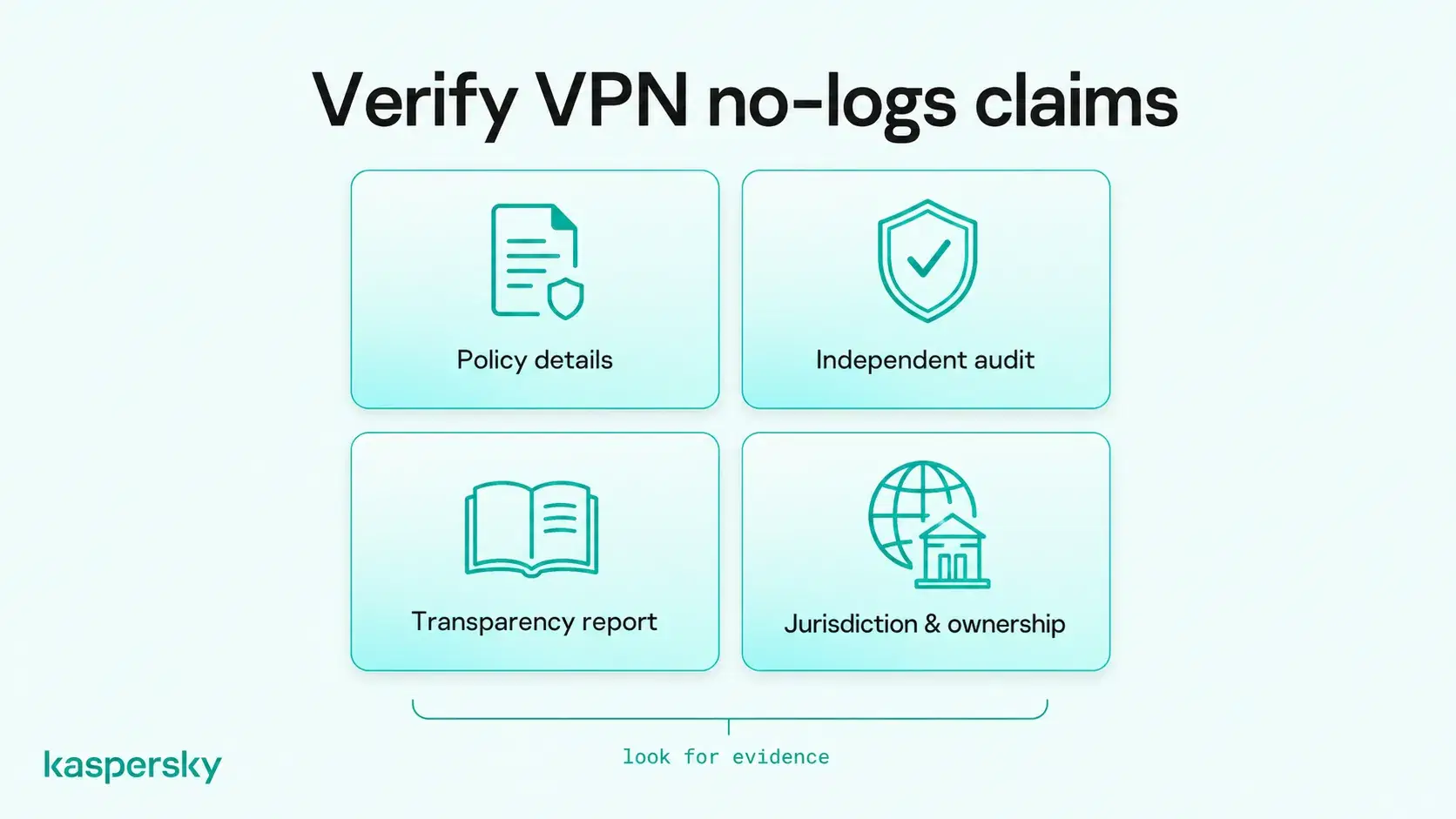
After looking at the policies, look at the company itself. With a transparency report that lists government data requests, and how the provider responded, you can see how it handles pressure to share user data. It also helps to know who owns the company and which country's laws it operates under.
Even with a strict no-logs policy, you still have to trust the VPN company. If you need to hide your activity from the provider too, an alternative solution like the Tor network might be a better option. Tor spreads your traffic across volunteer-run relays so that no single node knows both your IP address and the site you are visiting. Keep in mind though, Tor is usually much slower than a VPN, so it might not be the best fit for streaming or large downloads.
Why do independent VPN audits matter?
An audit is a review by an outside security firm or testing lab that checks whether a VPN works the way its provider says it does. Without one, you only have the provider's word that it doesn't keep logs.
Before you rely on an audit, check these details:
- Who ran it: A recognized security firm or testing lab, with no commercial ties to the provider beyond the audit fee.
- When it happened: An audit from several years ago may not reflect the current apps or server setup.
- What it examined: Some audits cover the full server infrastructure, while others test one app on one platform or review the policy documents only.
- Whether you can read the findings: Look for a full report you can read yourself, not just an "audited" badge on the provider's website.
Review the provider's track record as well. Search for past breaches or court cases that tested its logging claims, and note how quickly it disclosed problems and fixed them. Ultimately, audits and past performance are just snapshots. A clean track record or a single pass-mark doesn't guarantee that you’ll be safe today.
AV-TEST evaluated Kaspersky VPN for Windows and Android in November 2024. It tested connection stability, data throughput, encryption, leak protection and the kill switch. AV-Comparatives certified the Windows app the same month after IP leak, DNS leak and kill switch tests. Its report also notes that, according to Kaspersky's privacy policy, the product doesn't log traffic or originating IP addresses. Both labs publish their full reports, including the app versions tested, so you can see what was examined and when.
Which VPN security features should you look for?
Check that any VPN you're considering includes the following features as each one protects your data in a different way:
- Strong encryption: AES-256 and ChaCha20 are the ciphers most reputable VPNs use. Both are designed to leave intercepted traffic unreadable to someone watching the network.
- Modern protocols: The protocol sets how your device and the server build the encrypted tunnel. WireGuard is an option that is fast and runs well on phones, while OpenVPN has been around longer and works on a wide range of networks. IKEv2/IPsec reconnects quickly when your phone switches between Wi-Fi and mobile data. Reputable apps usually pick a suitable protocol automatically, so you won’t usually need to choose one yourself.
- Kill switch: If the VPN connection drops, a VPN kill switch is designed to block your internet access until the tunnel is back.
- DNS leak protection: Every time you open a website, your device sends a DNS request to look up its address. Leak protection keeps those requests inside the tunnel, so your internet provider shouldn't be able to see which sites you look up.
Kaspersky VPN supports WireGuard, which encrypts traffic with ChaCha20, and Catapult Hydra, which uses AES-256 and is optimized for long-distance connections. The app picks a protocol automatically by default, though you can also manually select a protocol on Windows, macOS, Android, and iOS. A kill switch is included across the Windows, macOS, Android, and iOS apps.
Independently tested and awarded by the industry's leading labs.



How important are VPN speed and server locations?
VPN speed is most important for streaming, gaming and video calls, where delays and buffering are the most noticeable. When comparing providers, focus on real-world performance and useful server coverage rather than network size alone.
You can judge a VPN's performance on four measurements:
- Download and upload speed: How quickly files and video arrive or leave.
- Latency (ping): The delay before data starts moving.
- Stability: Whether the connection holds for hours without dropping.
- Server availability: Whether you can reach the country you need at busy times.
Streaming in HD or 4K needs steady bandwidth more than a low ping. Online games react to latency, so you’ll experience lag with even a short delay.
For gaming, look for a provider with reliable servers near the locations you typically need, as shorter routes can help reduce latency. More broadly, don't judge a VPN by its advertised server count alone. Reliable coverage in the countries and regions you actually use is more important than a large network in locations you may never connect to.
Your speed on any server also depends on:
- how many other users share that server
- your own internet connection's speed
- the protocol in use, since WireGuard is often faster than OpenVPN
Kaspersky VPN has servers in more than 120 locations across over 90 countries and can pick the fastest available server automatically. You can still choose a specific country when you need an IP address there.
How do you choose a VPN for your devices and everyday use?
Pick a VPN with apps for every operating system you use and enough simultaneous connections for all your devices. Then check that everyday tasks, like changing servers or turning on automatic connection, take only a few taps.
Make a list of the devices, networks, apps and services you rely on, since that's the most practical guide to how to choose VPN software for everyday use.
Consider:
- Platform support: Most providers support Windows, macOS, Android and iOS. Check support for anything else you own, such as a Linux laptop, a smart TV or a games console. For devices that can't run a VPN app, a VPN set up on your router can cover the devices on your home network.
- Apps vs. browser extensions: A browser extension only protects traffic inside that browser, not your other apps.
- Connection limits: Two phones, two laptops, a tablet and a TV already add up to six simultaneous connections, which is more than some entry-level plans allow.
- Ease of use: A searchable server list, a favorites option and clear labels for the kill switch and automatic connection make the VPN easier to keep switched on. If changing a setting takes five taps through unclear menus, you may end up leaving the VPN off.
One Kaspersky VPN subscription protects up to 10 devices at the same time across Windows, macOS, Android and iOS, or every device on your home Wi-Fi through a compatible router. You can connect with a single click.
How much should you pay for a VPN?
The most expensive VPN isn't automatically the best, and a cheap one may cut costs on servers, support or audits. Compare what each plan offers for the price, including privacy, security, speed and device coverage.
Running a VPN service costs money, so if you're comparing a free VPN with a paid one, check how the free service is funded. Free plans may include ads, data limits, fewer server locations, restricted features, or different data practices.
What should you check before buying a VPN subscription?
Read the plan details before you enter payment information. These are the terms most likely to change what you pay or what you get:
- Introductory and renewal prices: Many providers discount the first term and renew at a higher rate. Check the renewal price on the checkout page and add up the total for the full term, rather than relying on the advertised monthly equivalent.
- Subscription length: Two- and three-year plans often cost less per month but are paid upfront, which can lock you into a service that doesn’t perform well.
- Automatic renewal: Find out how to switch it off and whether the provider sends a reminder before it charges you.
- Device limits and included features: Confirm the plan you're buying covers all your devices, and check whether split tunneling, dedicated IP addresses or router support cost extra or come only with higher tiers.
- Free trials and money-back guarantees: Read the conditions. Some trials need payment details upfront, and some refund policies exclude purchases made through an app store.
Kaspersky VPN offers a 7-day free trial, which you can cancel at any time, with all features on up to 10 devices. Paid plans come with a 30-day money-back guarantee.
How should you test a VPN before committing?
A free trial or refund period lets you see how a VPN behaves on your own devices, networks and services. Try these checks in the first week, while you can still cancel:
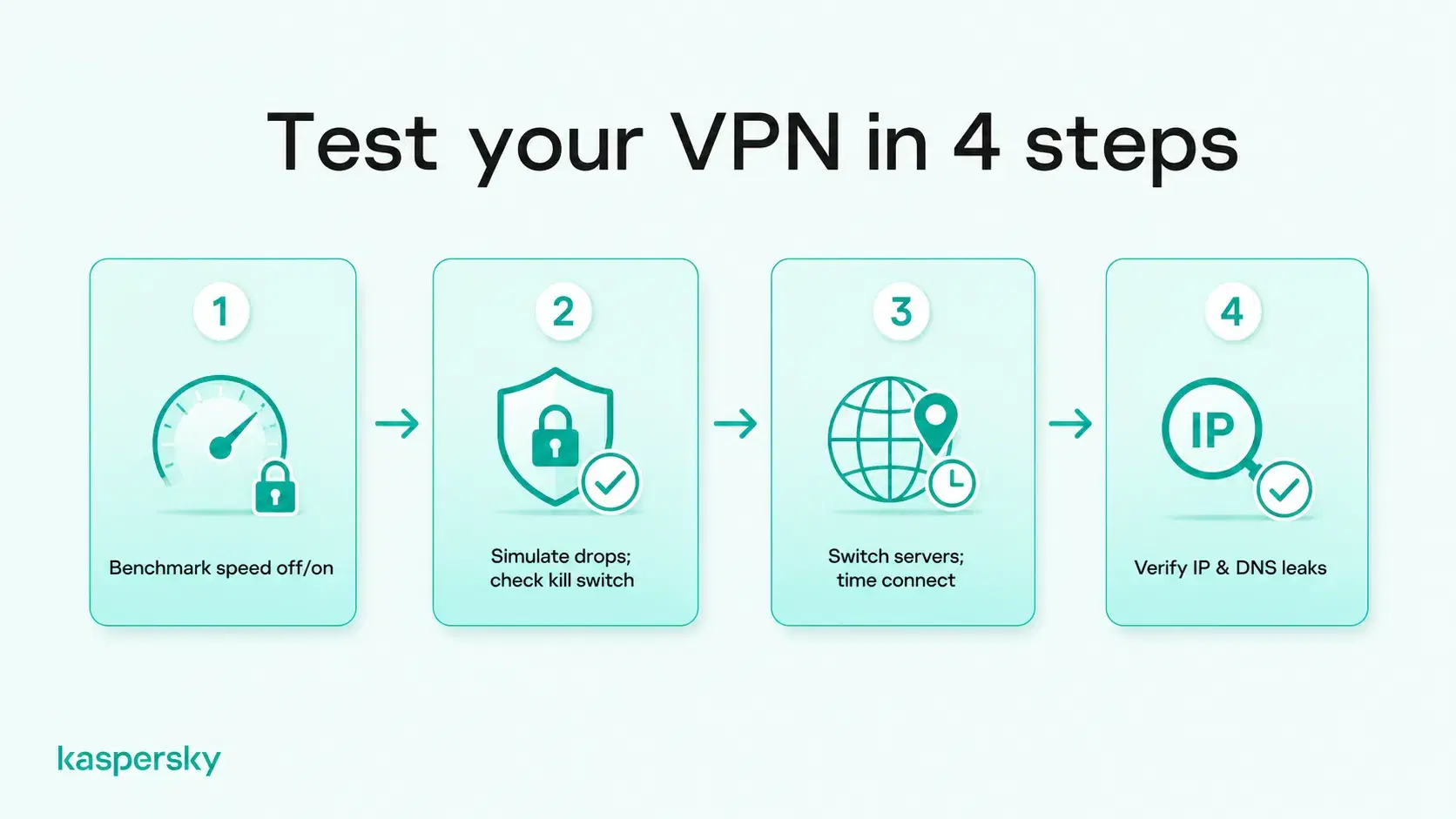
- Run a speed test with the VPN off, then on, using your usual server.
- Leave the VPN connected through a normal day of work, streaming or gaming and note any drops.
- Switch between two or three servers and time how long each connection takes.
- Turn airplane mode on and off, then walk out of Wi-Fi range on your phone, and check the VPN reconnects each time without you stepping in.
- Open the apps you rely on, such as banking, streaming and work tools, and check each one loads.
- With the kill switch on, force the VPN to drop by switching Wi-Fi networks, and check web pages stop loading until it reconnects.
- Visit an IP and DNS leak test site to confirm only the VPN server's details appear.
- Send customer support a question and note how quickly it replies and whether the answer helps.
Related Articles:
- What is a VPN?
- VPN vs. proxy server: which one should you choose?
- What is a VPN kill switch?
- How to choose the best VPN server location
Related Products:
FAQs
Can you trust VPN reviews and comparison sites?
VPN reviews can be useful, but check how recommendations are produced. Look for transparent testing methods, recent results, verifiable evidence, and disclosed affiliate relationships. Compare several reputable sources rather than relying on a single ranking.
Does it matter where a VPN company is based?
Yes. A VPN company's location determines which laws and government requests it may be subject to. However, jurisdiction alone does not determine privacy, so also consider logging practices, transparency, security history, and independent audits.
Can you change VPN providers easily?
Yes. Changing VPN providers is usually straightforward: cancel your old subscription, install the new VPN, and configure it on your devices. Check automatic renewal, refund terms, and router settings before switching.
Should you use the same VPN on your phone and computer?
Yes, if the VPN supports both platforms and enough simultaneous connections. Using one provider can simplify setup and account management, but check whether important security features are available on both your phone and computer.


