Most people give away more about themselves online than they realize, often without a second thought. Each piece looks harmless on its own: a birthday post, a photo with a street sign in the background, a quiz about your first pet that you answered because a friend tagged you.
Taken together, though, they add up to a profile complete enough for someone to impersonate you, find you, or answer the recovery questions on your accounts. This article covers what that profile is used for, which details carry the most risk, and how to pull back what you've already exposed.
What you need to know:
- Individually harmless details combine into a profile that can be used to impersonate you or locate you.
- Attackers often don't need to breach an account when the information is already public.
- Security question answers are credentials, even when a quiz makes them feel like trivia.
- Photos and short voice clips can reveal location, routine, and enough material for cloning.
- Text typed into AI chatbots may be retained or reviewed, depending on the service.
- Removing exposure late still reduces harm, so a delayed cleanup is worth doing.
How does oversharing online create personal data risks?
Oversharing creates personal data risk because details that look harmless alone combine, across accounts, into a profile complete enough to impersonate, locate, or manipulate you. Scrapers and data brokers assemble the pieces without your knowledge.
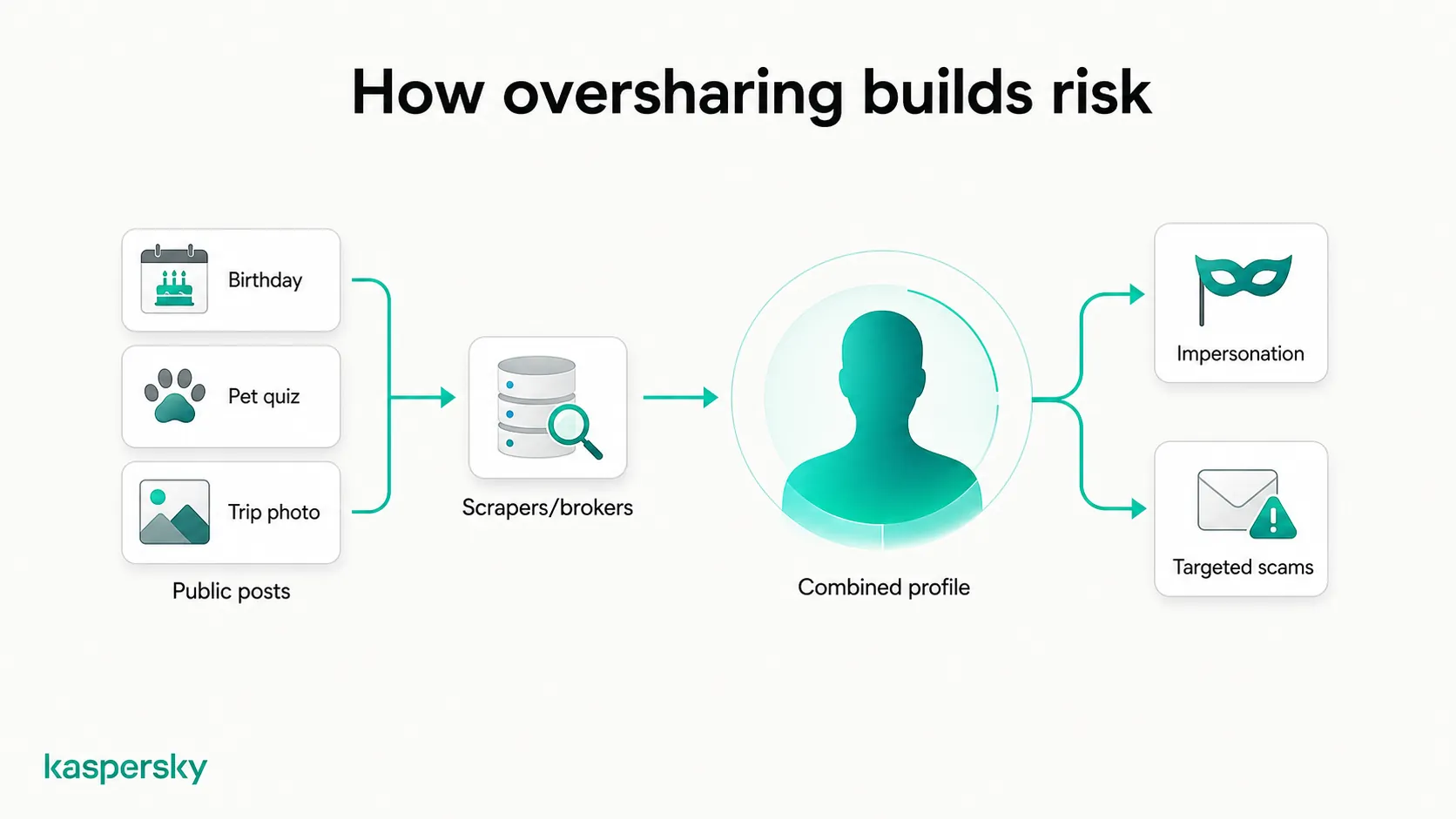
Often, it isn't a single post that creates the biggest risk. It's the combination that does the damage: a school name in your bio, a hometown in a comment from 2019, your partner's name in a photo caption from last month. Scrapers can collect public information automatically, data brokers may aggregate and sell personal data from multiple sources, and search engines can make publicly accessible information easier to find.
In a technique known as social engineering, scammers use these details to make a fake message convincing. An email that names your recent trip and your child's school comes across as legitimate because the details check out. But all that proves is that the sender read up on you.
This is also why account security alone isn't enough. A strong password protects your accounts but does nothing about what you've already made public, such as your birthday or your pet's name you typed into a social media quiz.
Sharing personal information online: which details carry the most risk?
You can share almost any detail safely in the right context, but your risk increases depending on the audience, how long the post stays up, and what else is already public about you.
Identity details: full name, date of birth, and family names
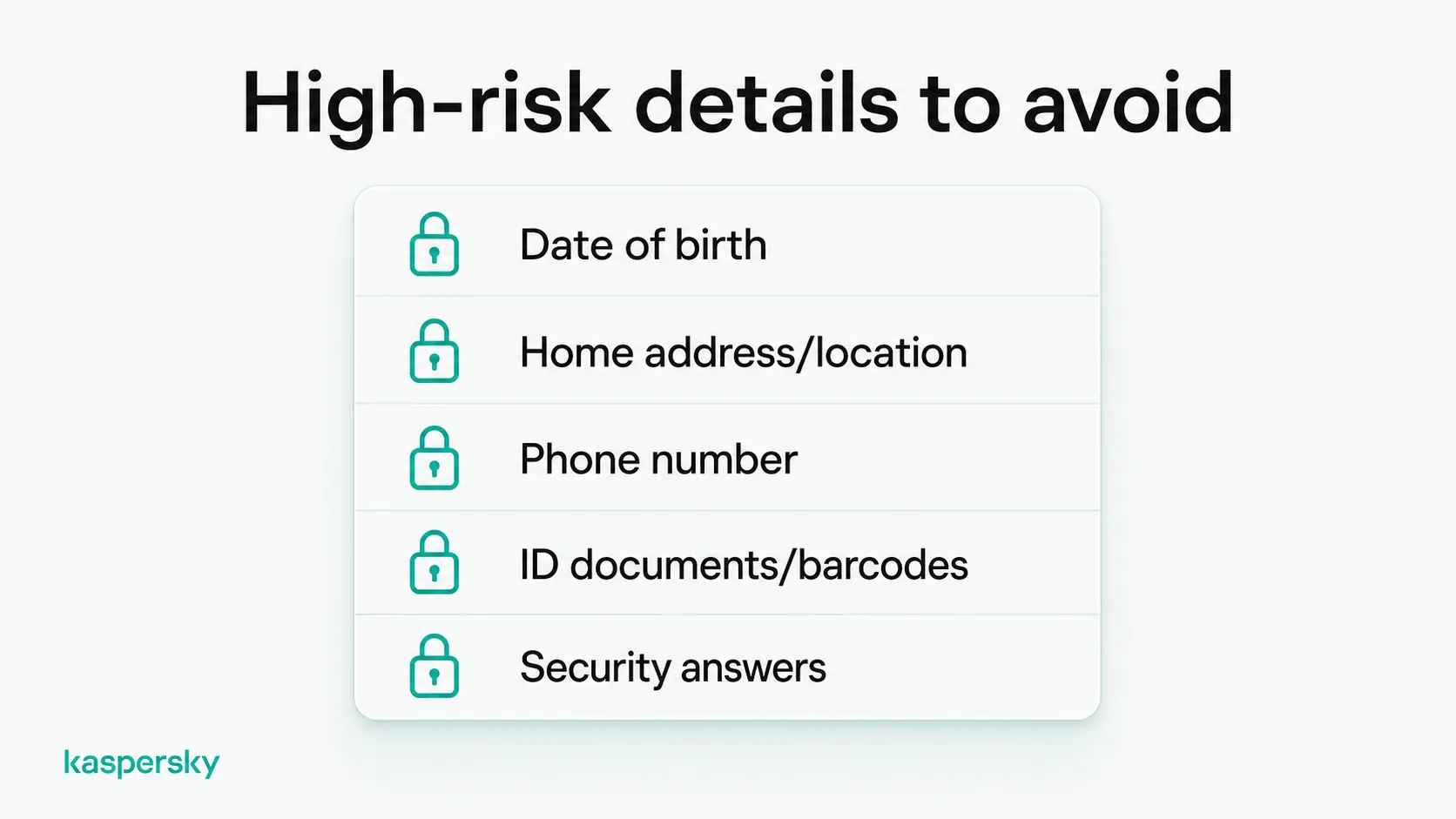
Your full name and date of birth sit at the top of most verification forms, which is why they're the first two fields a fraudster confirms when attempting identity theft. A public birthday post hands over yours to the day, and a "happy 60th, Mom" comment hands over the year of hers.
Family names matter for a different reason. A scammer who knows your name and your sister's can text her from a new number, claim to be you, and ask for money before she thinks to check. They got her name off a photo you tagged, and the attempt lands on her phone, so you find out only if she tells you.
Birthday and anniversary posts can remain searchable or visible for years, creating a lasting record of information that may seem insignificant when it is first posted. The one you posted years ago is still working for anyone who looks.
Hide your birth date on every profile that offers the option, then view your own profiles while logged out to see what a stranger can still read.
Contact details: phone number and email address
Your phone number can be an important recovery and authentication method for many online accounts. Password resets, one-time codes, and identity checks may all rely on it. That's why SIM swapping targets the number and not the handset. An attacker who controls your number can work through your accounts one at a time.
Post your number publicly and it gets scraped into spam lists, used in phishing calls and texts, and typed into people-search sites to see what else is attached to it. Email addresses work the same way. An exposed email address can also help scammers identify other accounts and services connected to you, particularly when combined with information from data breaches and other public sources.
Keep a separate email address for public listings, marketplace ads, and sign-ups you don't trust. Use your main address for important accounts, and check whether it's turned up in a known breach.
Location: home address, geotags, and real-time check-ins
Where you've been lets a stranger build a profile of your habits. Sharing where you are in real time can create physical and privacy risks, from unwanted visits to doxing. Geotagging is the obvious source, and on most platforms it's a single setting. The rest is harder to control as photo metadata can carry coordinates unless the platform strips them on upload, and a recognizable building behind you, a school logo on a uniform, or a gym tagged three times a week can narrow a search radius fast.
A photo from the airport lounge tells anyone who can see it that your home is empty, and roughly for how long. Turn off location tagging by default, and post travel photos once you're back.
Documents and identification
Photographs of documents are among the most damaging things to post by accident. Passports, driver's licenses, ID cards, boarding passes, and event tickets can expose sensitive identifiers, document numbers, booking references, or barcodes that may be useful to criminals.
Boarding passes are a common example, and it's the barcode that causes the problem. It encodes a booking reference, and that reference can be enough to pull up your reservation, view the passenger record, change a seat, or cancel a flight. Depending on the airline and booking system, a booking reference combined with other passenger details may allow someone to access or modify parts of a reservation. Exposed ID details can also provide useful information for identity fraud, impersonation, or attempts to pass identity checks.
Blurring or partially covering sensitive details may not protect them reliably. Depending on how an image was edited, information can remain visible or recoverable, while other identifying details may still be exposed.
If you need to share an image, crop sensitive information out rather than simply blurring it. Where possible, don't post identification documents at all. Send them only through a channel the recipient has confirmed, and if you receive an unexpected request for a document, end the conversation and contact the organization using a number you look up yourself.
Photos, video, and voice recordings
Every photo carries more than its subject. The background can show your street, your car, the layout of your home, and the make of the laptop on the desk. Post enough of them and the pattern shows your routine, which a scammer can use against you.
Voice and video add a different problem. Short clips can supply enough material to imitate how you speak, and cloned audio has turned up in urgent calls to relatives asking for money. A few seconds of a birthday video is a small sample, but it can still be enough.
Sharenting, the habit of posting regularly about your own children, goes beyond security. It builds your children a public record they didn't choose, and uniforms, class names, and pick-up points tend to appear in the same frame as the child. The other parents and relatives in your photos have a stake in that record too, and most are never asked.
Restrict who can see photos of your household, and turn on the tagging controls that let you review a photo before it appears on your profile.
Financial details and purchases
A screenshot of a transfer gives away more than the amount. It also shows the last digits of an account, a balance, a merchant name, and the app you bank with. That last detail matters most, because it tells a scammer which brand to imitate when they call you. Visible signs of wealth can also make someone a more attractive target for certain types of fraud. Posting a new car or second property, for example, may reveal more about your financial situation than you intended.
Other financial details leak without you posting anything at all. Depending on the service and its privacy settings, wish lists, payment profiles, and fundraising pages can expose identifying or contact information. A payment handle can turn your display name into your legal one, and a fundraising page prints that legal name right next to the reason you need money. Between the two, a scammer has a way to reach you and a story you already want to believe.
Keep financial activity out of public posts and review the privacy settings in any payment apps you use. Check who can see your profile and transaction activity, as privacy options and default settings vary between services.
Answers to security questions
Security question answers are credentials that look like trivia, which is why nobody guards a first pet's name the way they guard a password.
Quizzes and tag games map neatly onto standard recovery questions: first car, first school, the street you grew up on, mother's maiden name. A nostalgia post about your first concert is harmless on its own, but combined with a public birthday and the hometown in your bio, it becomes part of an answer key.
Where possible, choose stronger recovery and authentication methods instead of security questions. If a service requires security questions, use answers that cannot be discovered from public information and store them securely in a password manager. Also, turn on multi-factor authentication wherever a service offers it, which reduces how much weight those questions carry when you're locked out of an account.
Information shared with AI chatbots and assistants
AI tools feel private, because the format looks like a one-to-one conversation, with no audience and no post button, but the text you type doesn't always stay between you and the screen. Depending on the service and its settings, your conversations may be stored, read by reviewers checking quality, or used to train the next version of the model. Controls differ from product to product, and the default isn't always private.
What you share with these tools is often sensitive: health symptoms and dates, financial documents dropped in for a summary, work contracts, or messages from other people who never agreed to any of it.
How AI services handle your information can vary by product, account type, and settings. Some workplace or business services may offer different retention, privacy, or training controls from consumer versions, so check the terms and settings before sharing sensitive information.
Review the retention and training controls in each tool you use, and remove names, account numbers, addresses, and other identifying details before sharing sensitive information.
How can you tell if you are oversharing on social media?
Over posting on social media isn’t something usually done intentionally, which is why an audit works better than trying to remember. It takes about ten minutes per account and needs no special tools.
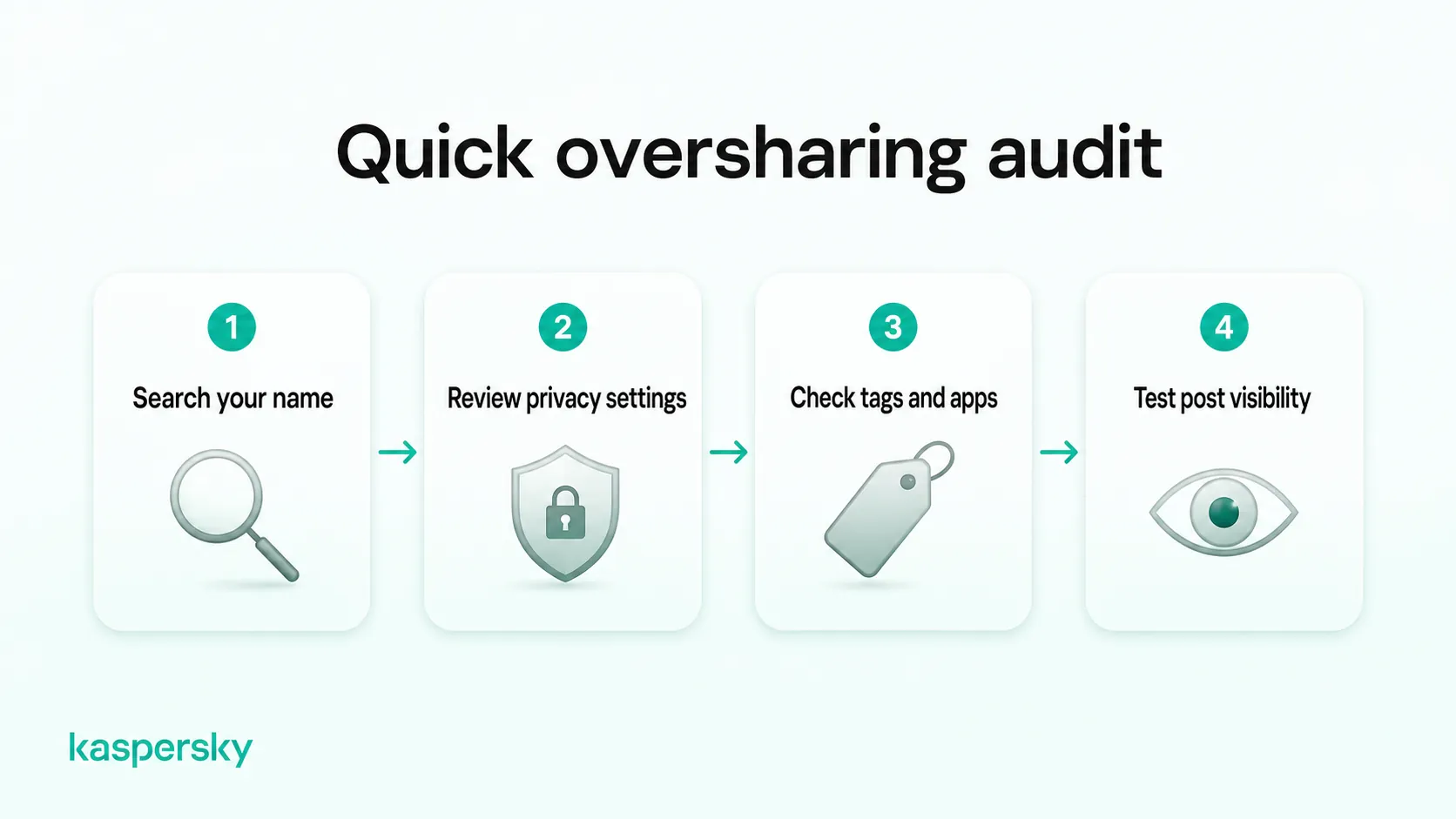
- Search your own name. Use a private browsing window and search your name, then your name with your city, then your name with your employer.
- Check audience settings, platform by platform. On Facebook, review older posts as well as current privacy settings, and use the available controls to restrict the audience for past content where necessary.
- Review tagged and archived content. Other people's posts about you follow their privacy settings, not yours, so a tagged photo can be public while your profile isn't.
- Audit connected apps. Services you authorized years ago may still be reading your profile, your friend list, and in some cases your posts.
- Test a post before it goes up. Ask who can see it, how long it will stay visible, and what it gives away next to what's already public about you.
It’s normal to find information about yourself at this stage. Much of it may be old and can still be removed or restricted.
How do you stop oversharing personal information online?
You stop oversharing personal information by locking each account down first, then widening it only where you need to. Cleaning up later is possible, but it works less well than never posting the thing at all.
- Start private by default. New accounts, new posts, and new albums begin restricted, and you widen the audience when there's a reason to.
- Separate your public and private identities. Keep one profile for work and strangers, another for people you know, and write the public one for the audience it really has.
- Turn off location and metadata at the source. Disable geotagging in the camera app and in the social app, rather than relying on yourself to strip it post by post.
- Cut app permissions back. Remove authorizations you no longer use, and decline contact-list access unless a feature depends on it.
- Build a pause habit. Before posting anything involving location, documents, or another person, wait long enough to ask whether it needs to be public at all.
- Tell other people what you'd rather they didn't post. Ask family not to tag your home, share photographs of your children, or announce your travel dates while you're away.
You don't need to disappear from the internet. You need the details that unlock accounts, prove your identity, or place you at an address to stay out of public view.
Independently tested and awarded by the industry's leading labs.



What should you do if you have already shared too much?
If you've already shared too much, delete or restrict the most identifying posts first, starting with the most recent. Then change the passwords and security answers those posts could help someone guess, and report any misuse that's already started.
Work in order of exposure
Delete or restrict recent posts first, since those carry current information, then work backwards through birthday posts, travel albums, and anything showing a document. Deletion only reduces what's out there, because a post can survive in caches, screenshots, and reposts long after it leaves the platform.
Take down content on other sites
Search engines run removal request forms for pages that expose contact details or identification, and in many jurisdictions data brokers have to honor opt-out requests, though the process is slow and listings often reappear. Our guide to personally identifiable information (PII) sets out the removal steps in more detail.
Secure important accounts
Change passwords anywhere you've reused one, and check which phone numbers and email addresses are listed as recovery options. Replace any security answer a reader of your old posts could work out.
Report misuse as soon as you spot it
Keep a record of any reports you make, along with relevant messages, transactions, and other evidence, as banks, credit bureaus, or authorities may ask for documentation. In the US, report identity theft at IdentityTheft.gov and internet crime to the FBI's IC3.
Outside the US, report suspected fraud or identity crime to the appropriate police, cybercrime, identity-theft, or consumer-protection authority in your country. Watch your accounts and your credit file too, since misuse usually shows up there before you hear about it anywhere else.
Related Articles
- How to stop data brokers from selling your personal information effectively?
- Learn more about What to do if your identity is stolen a step by step guide
- How can we ensure children photos and online safety when sharing?
- What are the key concerns about social media privacy today?
Related Products:
FAQs
Is it safe to share personal information with strangers online?
Usually not. Strangers online can't be verified, and details that seem harmless can be combined with what's already public about you. Share only what you would be comfortable seeing attached to your name permanently, and treat unsolicited questions about your personal life as suspicious.
What personal information should you never share online?
Identification documents, financial account details, and answers to security questions are the clearest cases, since each can be used directly rather than combined with something else. Home addresses and real-time location come close behind, because they carry physical risk as well as fraud risk.
How does oversharing on social media lead to identity theft?
Identity theft usually needs a few verified details rather than one. A name, date of birth, and address taken from public posts can be enough to open credit or pass a recovery check, especially when security answers appear in old quiz replies.
Is it risky to share personal information with AI chatbots?
It can be. Deleting a conversation from your history doesn't always delete it from the provider's systems, and turning off training may not stop them storing chats. Check what each setting covers rather than assuming the two are the same.
How can you find out what personal information about you is already online?
Search your own name in a private browsing window, along with your name plus your city and your employer. Check people-search and data broker sites for listings, review what each social profile shows when logged out, and look up your email in a breach checker.


