Choosing a VPN server location has a big impact on speed and privacy. It also impacts what content you can access. The “best” server location isn’t the same for everyone. The best country for VPN users to connect to depends on individual needs and priorities.
What you need to know:
- The best VPN server location depends on your goal, such as privacy or accessing specific content.
- Nearby servers usually provide faster speeds and more stable connections.
- Some countries offer stronger privacy protections than others.
- Changing location can affect what websites and streaming content you can access.
- The VPN provider and its no-logs policy matter as much as the server location.
What does “VPN server location” mean?
A VPN server location refers to the country or city you connect to inside a VPN app. Your real IP address is replaced with one from that location. This is what websites and services detect when you connect to them.
This means your online activity appears to come from wherever the VPN server is based. The location can affect what content you see and how your data is handled. VPN providers offer a wide range of locations across the world to give users flexibility. This allows people to choose servers to access region-specific content or to ensure privacy.
Why VPN apps list many countries and cities
VPN providers operate large global networks of servers spread across different regions. These networks are designed to handle user demand while offering reliable connections from as many locations as possible.
Users can change their virtual private network location easily. Providers often offer several cities from each country to improve performance and reduce congestion from many users connecting at the same time.
Having more city options also helps users connect to a server closer to their actual location. All of these servers are a way to protect Personally Identifiable Information (PII) and mask your IP address.
More than 6000 high-speed servers
Kaspersky VPN connects via 6000+ servers in 85 locations, so you know you’re always protected.
What changes when you switch VPN server locations
Switching VPN server locations means your visible IP address changes to match the new location. Websites and apps will treat you as if you are browsing from that country or city.
This can affect what content is available and even which prices or features are shown. Some websites may display different versions based on region. Others may restrict or allow access depending on location.
People often switch server locations to access content on a streaming service. There are other reasons. It can improve connection speed, avoid congestion, or maintain privacy by routing traffic through a different country.
What is the best VPN location?
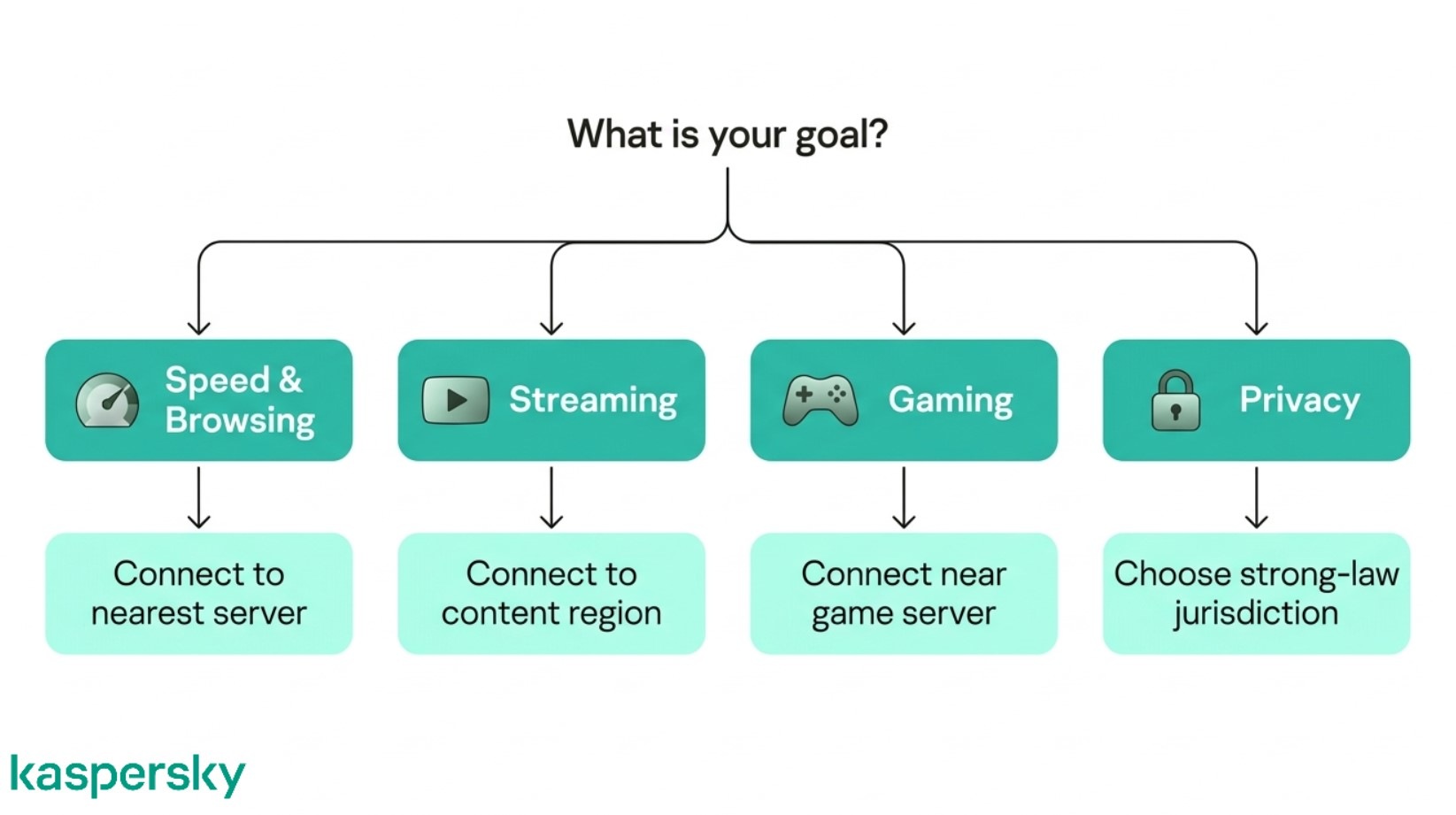
The best VPN location depends on what you want to achieve. Factors like access to content and connection stability all play a role in choosing the right server.
Nearby servers usually offer better performance. However, distant servers may be useful for accessing specific content or services. The right choice comes down to balancing features with your specific needs.
The fastest VPN location for everyday browsing
Nearby servers reduce latency when routing your traffic which helps websites load faster and keeps connections stable.
Local servers may be the best option for everyday browsing and general use. They tend to provide speed and reliability. Connecting to the closest available server is usually the fastest choice.
Situations where another country works better
There are times when connecting to a different country makes more sense or is entirely necessary. This is often the case when accessing region-specific websites or content. A different country’s version of a streaming service may have a specific show you want to watch.
Switching locations can also help if nearby servers are slow or crowded. A server in another country may provide a more stable or responsive connection.
Does VPN location affect your internet speed?
Yes, VPN location can have a noticeable impact on speed. Performance depends on several factors including the quality of the provider’s network.
Performance also depends on server load, network congestion, routing efficiency between networks, your internet connection speed, and the quality of the VPN provider’s infrastructure. Location and distance are just one part of a larger set of factors.
How server distance affects connection speed
The further away a VPN server is, the longer it takes for data to travel back and forth. This increases latency and can slow down browsing and streaming. Distant servers may feel slower due to the extra distance data has to travel.
How server load can slow down your VPN
VPN servers are shared between many users. Servers can become congested when more people connect to them. This can lead to slower speeds or unstable connections during peak usage times.
When switching VPN servers improves speed
Changing to a different server can often improve performance. A nearby server with fewer users may offer faster speeds than a crowded one.
Testing a few local or regional servers is often the simplest way to find the best-performing option for your connection. Remember that the servers may be busier at certain times. This means that the quickest servers may change periodically.
Which VPN server locations work best for streaming?
Streaming platforms show different content depending on your location. This is due to licensing agreements limiting what can be viewed in each country.
Finding the best VPN country for IPTV or other streaming services often means finding the location where the content you want to see is available. But it is also important to ensure that the VPN server is reliable in terms of speed and stability. It can be frustrating when streams are unreliable. They may drop in quality or buffer and load slowly. The emphasis is on finding a reliable server in the location you need.
How streaming platforms detect your location
Streaming services use your IP address to determine where you are connecting from. This location decides which content library is available.
Many platforms also use additional checks to detect VPN usage and restrict access if they identify shared or suspicious IP addresses. Trusted and reliable servers can provide access without being blocked.
Accessing different streaming libraries with a VPN
Switching VPN server locations is a way for people to access different regional streaming libraries. Connecting to a UK server may allow access to BBC iPlayer. A US or Indian server may show a different Netflix catalog.
This also applies to IPTV services. The server location can affect both availability and streaming quality.
What to do when streaming stops working with a VPN
Streaming platforms sometimes block known VPN IP addresses. The content may stop loading or display an error.
Try switching to another server in the same country. This often resolves the issue. Changing to a different location or server may restore access and improve streaming performance or speed.
What VPN location should you choose for gaming?
VPN server location directly affects many aspects of gaming including latency and stability. Even small delays can impact gameplay, and gamers need reliable VPN connections.
Using a VPN can protect against DDoS attacks. Games like Minecraft and League of Legends have been targeted by these types of attacks in the past.
The best country setup usually depends on how close the VPN server is to the game server and how efficiently traffic is routed.
Reducing lag by choosing the right server
To minimize lag, choose a VPN server close to the game server you are connecting to. The shorter the distance, the lower the latency (ping). This is crucial in many games.
Servers far away mean data takes longer to travel. This can cause input lag and slower response times in multiplayer games. Demanding games relying on quick actions are most impacted.
When a VPN can improve gaming stability
While the closest server often delivers the best performance, there are exceptions. Network congestion on local servers can make them slower. Some VPNs have inefficient routing paths that increase lag. Packet loss between your device and the game server can also occur on some servers. This means that not all the data is being transmitted across the network. This can cause lag and buffering.
Some internet service providers also use throttling techniques to reduce bandwidth usage.
Efficient and reliable VPNs can make the connection more stable by bypassing throttling and avoiding issues with packet loss and other unstable factors.
Does the VPN country matter for privacy?
VPN location may affect how data is handled under local laws and regulations. One country may have different rules when compared to another.
The VPN provider’s policies should outline what happens to your data. Read them to fully understand their encryption and data protection processes.
Many people assume that choosing a “private” country guarantees anonymity. The real protection depends on how the service is built and managed.
Protect your privacy
Kaspersky Premium offers various tools designed to protect your devices, including an unlimited VPN designed to provide reliable and fast virtual connections all over the world.
Try Premium for FreeWhy VPN provider policies matter most
A VPN’s no-logs policy is one of the most important privacy features. If a provider does not store activity logs, then there is little data that can be shared or exposed. No-logs policies do not store data on sites visited or downloads.
Strong encryption and secure infrastructure also play a key role. These protections should remain consistent across the network (and all the locations you can choose).
When server jurisdiction can affect privacy
Different countries have different data laws. There are varying requirements around data retention or cooperation with authorities. General Data Protection Regulation (GDPR) is used in much of Europe and provides an example of a framework for data handling.
Server location may influence how requests for data are handled. This may be mandated by law. Fully understanding both the provider’s policies and the server location gives a clearer picture of overall privacy.
What is a VPN kill switch and when should you use it?
A VPN kill switch is a feature that automatically blocks your internet connection if the VPN disconnects. This prevents your real IP address from being exposed during short connection drops.
It is especially useful when switching between VPN server locations or using unstable networks. Sometimes brief interruptions can happen without warning.
A kill switch is the protection against that. It is regularly used during activities like streaming or any browsing sessions where maintaining privacy is important. The trade-off is that your internet may stop working temporarily until the VPN reconnects. The upside? It ensures your data is not exposed.
Related Articles:
- What are the key benefits of using a VPN?
- What are the differences between Proxies & VPN?
- How does private browsing compare to using a VPN?
- Why is a Smartphone VPN essential for your online security?
Related Products:
FAQs
How do I know if I picked the right VPN server location?
If your connection is reliable and allows fast access to the content or services you need, you’ve likely chosen the right location.
Can I check where my VPN server is located?
You can check your visible IP location using online IP lookup tools. These show the country and sometimes the city of the server you’re connected to.
Can I use any VPN country, or does it matter which one I choose?
You can use any location, but it matters depending on your goal. Nearby servers are better for speed. Some specific countries may be needed for content access or privacy preferences.
Why does my VPN automatically choose a server location?
Many VPNs use a “quick connect” feature that selects the fastest or least crowded server based on your location to give you the best performance.


