
Tor Browser and a VPN app set out to do a similar job. Both aim to keep the site you visit from seeing your real IP address, and to keep your internet service provider from seeing which pages you open. Where they differ is in how they hide your traffic, and that difference determines which one is right for you.
Here is how each works, what each protects, and how to make the tor vs vpn choice.
What is the difference between Tor and a VPN?
The Tor browser passes your traffic through several volunteer-run relays before it reaches a website. A VPN passes it through one server run by your provider, which is faster but means trusting one company.
What you need to know:
- Tor routes your traffic through several volunteer relays, so no single relay sees both you and your destination.
- A VPN sends the traffic it covers through one provider's server, which is faster but places trust in that provider.
- Streaming, gaming, and large downloads usually run better on a VPN than over the Tor network.
- Tor Browser suits sensitive browsing and .onion sites where anonymity matters more than convenience.
- Neither option makes you anonymous if you log into accounts that identify you.
- Running both together adds delay and rarely improves privacy for everyday users.
Tor vs VPN at a glance
The table below compares Tor Browser and VPNs point by point, from encryption and speed to cost and ease of use.
|
Tor |
VPN |
|
|---|---|---|
|
How it works |
Traffic passes through three volunteer-run relays chosen at random |
Traffic passes through one server run by your provider |
|
Encryption |
Layered encryption between you and the exit relay |
Encrypted tunnel between your device and the VPN server |
|
Privacy and anonymity |
Built for anonymity, with no single relay seeing both ends |
Built for privacy, though the provider can see both ends |
|
Speed |
Slower, because traffic takes a longer path |
Close to normal browsing speed on a good provider |
|
Traffic coverage |
Only what runs through Tor Browser by default |
Usually every app on the device |
|
Cost |
Free |
Usually a subscription, and free tiers tend to be limited |
|
Ease of use |
Download the browser and go, though some sites block Tor traffic |
Install an app, pick a server, connect |
How are Tor and VPNs different from a proxy?
VPNs and Tor both encrypt traffic, while most proxies do not add their own encryption. A proxy can hide your IP address from the websites you visit, but it does not provide the same privacy model as a VPN or Tor.
A proxy server fetches web pages on your behalf, so the site sees the proxy's IP address instead of yours. Most proxies reroute traffic from a single app or browser and stop there, so anything you send over an unencrypted connection can stay readable to anyone watching.
A VPN adds encryption and usually covers every app on the device, though your provider can still see where you go. Tor goes further by splitting the journey across three relays, so the relay that sees your IP address is not the one that sees the site you visit.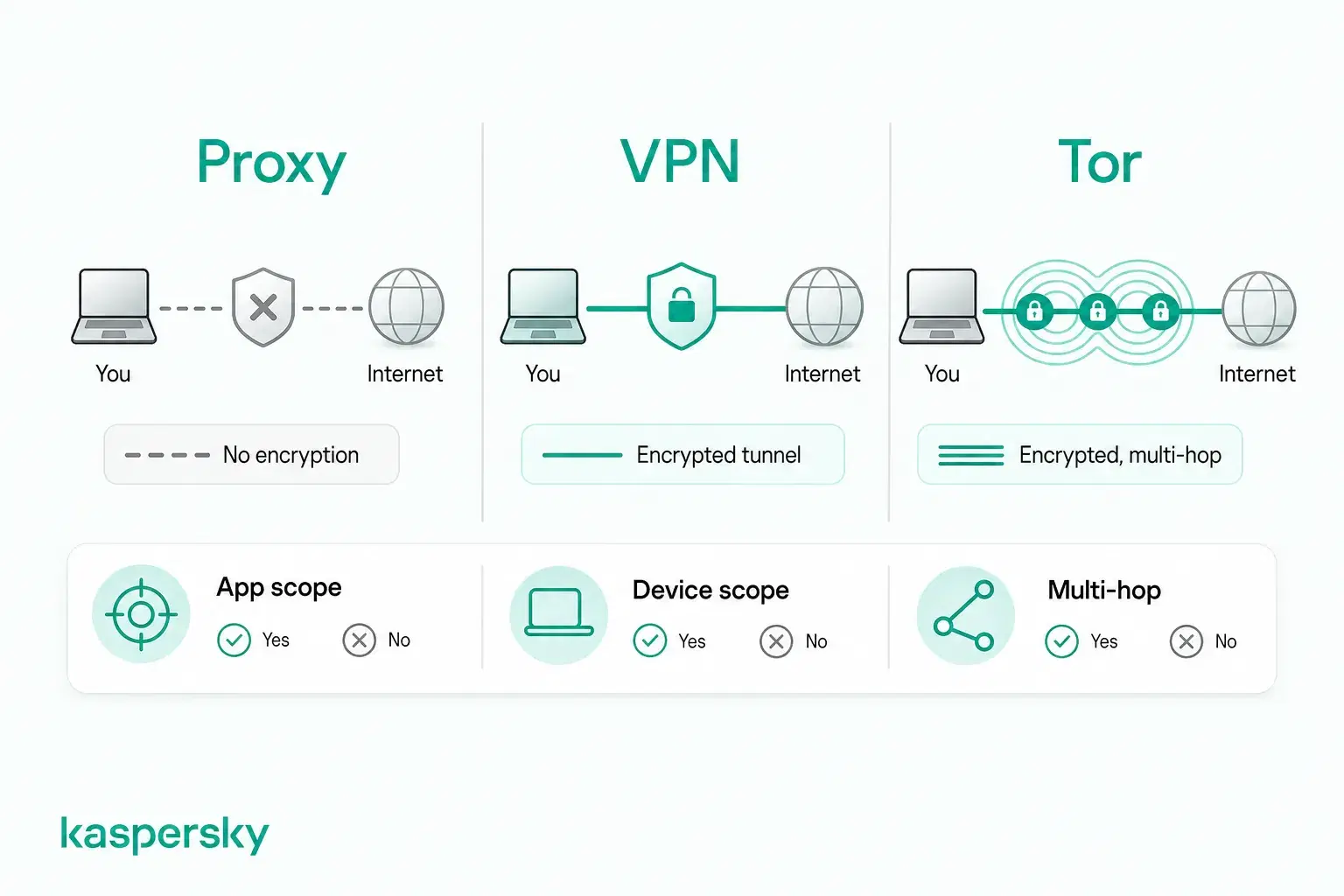
How does Tor work?
Tor sends your traffic through three relays before it reaches a website. Each relay is run by a different person or organization, so your address and your destination never reach the same one.
Relays are servers run by individuals, universities, and nonprofits who donate the bandwidth. Several thousand are running worldwide, and no single organization owns the network. There is no central body a court could order to hand over a complete record of who used it.
Your traffic is wrapped in three layers of encryption before it leaves your device, which is where the name onion routing comes from. The entry relay, sometimes called the guard, sees your IP address but not your destination. The middle relay sees neither end, only the relay before it and the relay after it. The exit relay strips the last layer and passes your request to the site, so it sees the destination but not you. The website logs the exit relay's IP address rather than yours.
Traffic leaving the exit relay is no longer wrapped in Tor's encryption, so whoever runs that relay can read anything you send over HTTP. HTTPS keeps it encrypted on that last stretch, which is why Tor Browser forces HTTPS wherever a site supports it.
Tor Browser is how most people reach the network. You download it, open it, and your browsing goes through Tor with no further setup.
How does a VPN work?
A VPN, or virtual private network, builds an encrypted tunnel between your device and a server run by the VPN provider. Your traffic travels through that server, so websites see the server's IP address instead of yours.
Your VPN app opens the tunnel as soon as you connect. From then on, your internet service provider can see that you are connected to a VPN server. While the tunnel holds, it should not see which sites you load or what you send them. The sites you visit see a server address that may sit in another country.
Most VPN apps work at the operating system level, which can cover your browser, your email client, and anything running in the background rather than one window at a time.
Your VPN provider can see your real IP address and information about the destinations you connect to, which makes the provider an important point of trust.” Move the logging/audit/legal-demand discussion to the privacy section only.
Which is better for privacy: Tor or a VPN?
Tor usually offers stronger anonymity, because one relay learns your address and a different relay learns your destination. A VPN can hide your activity from your ISP and your IP address from websites, though the provider can see both.
Three words get used interchangeably here, and they mean different things:
- Privacy keeps others from seeing what you do.
- Anonymity keeps them from knowing who is doing it.
- Security keeps your data from being read or altered on the way.
With a VPN, your ISP sees encrypted traffic heading toward a VPN server. The destination sees the VPN server. Your VPN provider can see your real IP address and information about the destinations you connect to. How much of that activity is recorded depends on the provider's logging practices and how it responds to legal demands.
Tor splits that knowledge across three separate operators instead of handing it to one company. A well-resourced adversary, such as a government agency watching traffic at both ends of the network, is the exception. It may still match the timing and size of what enters against what leaves, and work out who you are.
Neither option makes you anonymous on its own. If you log into an email account, the site knows who you are, no matter how your traffic got there. Account logins, cookies, and browser fingerprinting expose Personally Identifiable Information (PII) that neither Tor nor a VPN can hide.
Independently tested and awarded by the industry's leading labs.



Should you use Tor or a VPN?
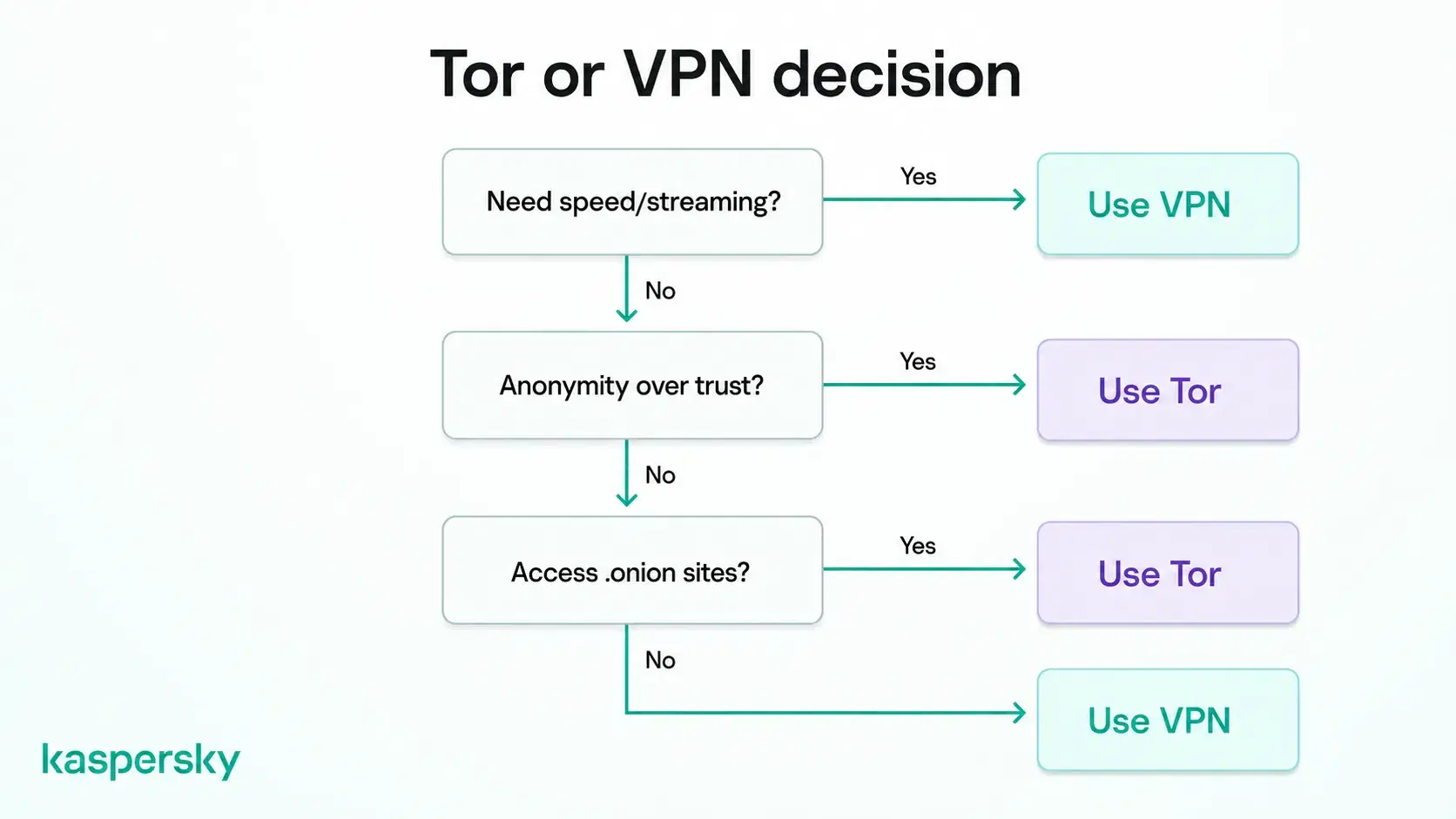
A VPN suits most everyday use, and Tor may be the better choice when anonymity is more important than page load speed.
When should you use a VPN?
- Everyday browsing, where you want your activity hidden from your ISP without giving up page load speed.
- Public Wi-Fi in cafes, airports, and hotels, where a VPN may reduce the risk of your traffic being intercepted.
- Streaming, gaming, and large downloads, which Tor is too slow to handle.
- Whole-device coverage, when you want the traffic from your apps routed through the VPN and not just one browser window.
Kaspersky VPN runs on Windows, Mac, Android, and iOS, and connects across all of them from a single subscription.
When should you use Tor?
- Sensitive research or reporting, where separating what you read from your home IP address matters more than a fast page load.
- Situations where you do not want to trust any single company, including a VPN provider, with a record of your browsing.
- Reaching .onion services, which exist only inside the Tor network and are used by sites that are harder to find, from secure document drop boxes to dark web marketplaces.
- Getting around censorship. Where Tor itself is blocked, Tor bridges act as unlisted entry points that are harder for a network operator to spot and filter.
Can you use Tor and a VPN together?
You can run both at once, and the order you connect in changes what each party along the path can see. Using them together does not automatically provide stronger privacy. Which setup makes more sense depends on which parts of the connection you want to hide from which parties.
Tor over VPN vs VPN over Tor: What's the difference?
Tor over VPN means connecting to your VPN first, then opening Tor Browser. Your ISP sees a VPN connection, and the Tor entry relay sees the VPN server rather than your home address. Standard VPN apps support this without special configuration.
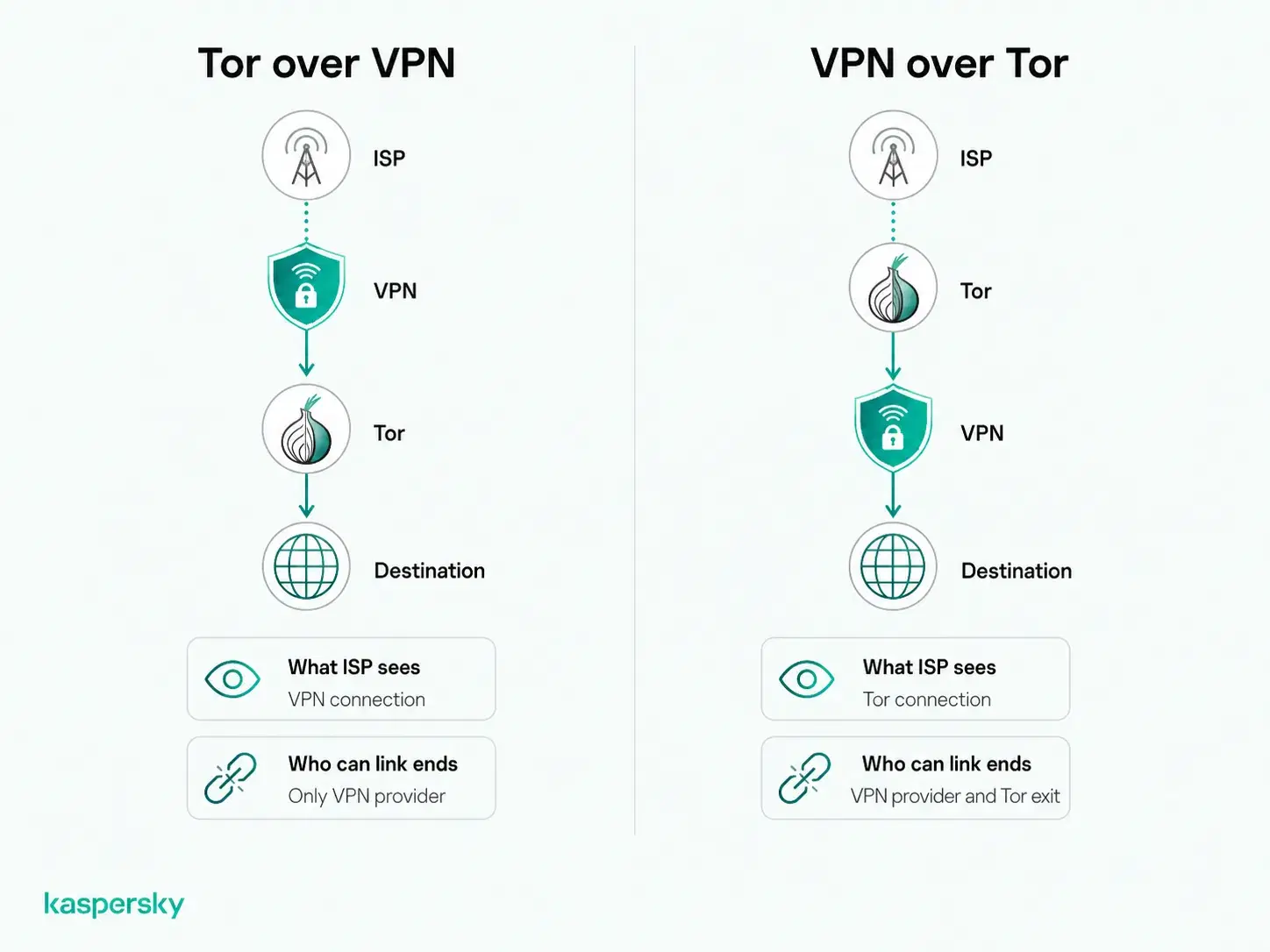
VPN over Tor reverses the order, routing your VPN connection through the Tor network. The Tor entry relay still sees your real IP address, and the destination sees your VPN server. Few providers support it, and setting it up takes work.
|
Tor over VPN |
VPN over Tor |
|
|
Connection order |
VPN first, then Tor |
Tor first, then VPN |
|
What your ISP sees |
A connection to a VPN server |
A connection to the Tor network |
|
What the VPN provider sees |
Your IP address and that you use Tor |
Traffic from a Tor exit relay, though your account details still identify you |
|
What the Tor entry relay sees |
The VPN server's address |
Your real IP address |
|
What the destination sees |
A Tor exit relay |
Your VPN server |
|
Setup |
Works with standard VPN apps |
Rarely supported, and harder to configure |
Neither setup is universally better. The trade-off depends on which parts of the connection you want to keep private from your ISP, VPN provider, Tor relays, or destination.
Do you need both?
Most people do not need both. Adding a VPN changes which parties can see different parts of the connection and can further reduce performance, but it does not automatically provide stronger anonymity.
Setup errors are a bigger risk. A DNS request that escapes the tunnel, or an app that ignores your proxy settings, can leak your real IP address without you noticing. For everyday internet privacy, one tool you understand may protect you better than two that are not configured correctly.
Related Articles:
- What is a VPN and how does it work?
- Tor Browser: What is it and is it safe?
- VPN vs proxy server: What's the difference?
- What is the deep web and how do you access it safely?
Related Products:
FAQs
Is Tor a VPN?
No. A VPN routes your traffic through one company's servers, and that company is able to see the sites you visit. Tor uses three relays run by different volunteers, so no single relay knows both your IP address and your destination.
Does Tor hide your IP address?
Yes. Websites you visit through Tor see the IP address of the exit relay rather than your own. The exit relay makes the final request on your behalf. Your anonymity can still slip if you log into an account, or download files outside Tor Browser.
Is Tor legal?
Tor is legal in most countries, including the United States and across the European Union. Some governments restrict or block it, and a few treat its use as suspicious. What you do while connected is still governed by local law.
Is Tor free?
Yes. There are no fees and no premium tier. Relays run on bandwidth donated by volunteers and organizations, which is why capacity is limited.


