Why are small businesses attractive targets for hackers?
Small businesses attract hackers because they handle valuable data and financial transactions but may have fewer resources to protect their systems. Cybercriminals can exploit these opportunities to steal money, compromise accounts, or gain access to larger organizations.
Not every attack is aimed at a specific company. Many cyberattacks are automated or widely distributed, with attackers using tools to identify exposed systems and common security weaknesses. Others deliberately target particular businesses, employees, supplier relationships, or payment processes.
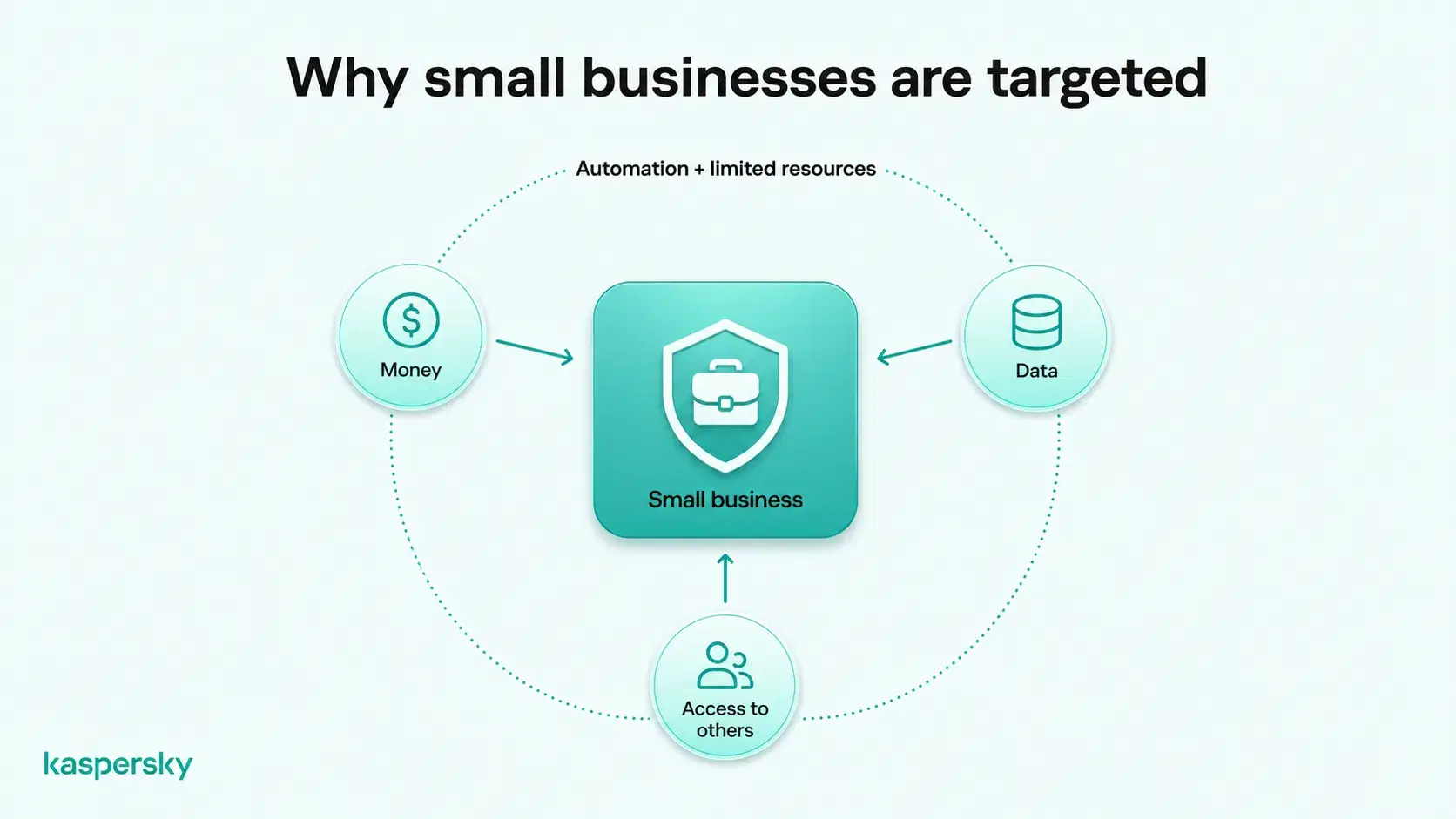
Money is one obvious motive. Attackers may try to steal from business accounts or commit other forms of financial fraud. Ransom payments are another way hackers can try to access money directly.
Small businesses can hold valuable information, including customer details, employee records, login credentials, and commercially sensitive data. Their relationships with larger organizations may also make them attractive targets, as attackers can sometimes use compromised suppliers or partners to gain access to other businesses.
Another factor is resources. Smaller companies may have limited IT support and often fewer formal cybersecurity processes. That does not mean small businesses are automatically insecure, but it can make common weaknesses harder to identify and fix quickly.
What you need to know:
- Small businesses can be targeted directly, but many attacks are automated or opportunistic rather than personally aimed at one company.
- Cybercriminals may be motivated by fraudulent payments, ransom, access to business accounts, or valuable company and customer data.
- Business email, employee credentials, customer records, and supplier relationships can all make a small company worth attacking.
- Connections with larger organizations can also create supply-chain risk, making smaller businesses useful stepping stones to other targets.
- Limited IT resources and fewer dedicated security processes can increase exposure if common weaknesses are left unaddressed.
- Basic protections such as MFA, unique passwords, security updates, endpoint protection, employee awareness, and tested backups can reduce many of the most common risks.
How do hackers attack small businesses?
Hackers commonly attack small businesses through phishing, social engineering, stolen credentials, malware, ransomware, and unpatched software. These methods can give attackers access to business accounts, sensitive information, or critical systems without requiring sophisticated techniques.
Phishing and business email compromise
Phishing emails, fake login pages, impersonation, and other forms of social engineering are commonly used to steal credentials or manipulate payments.
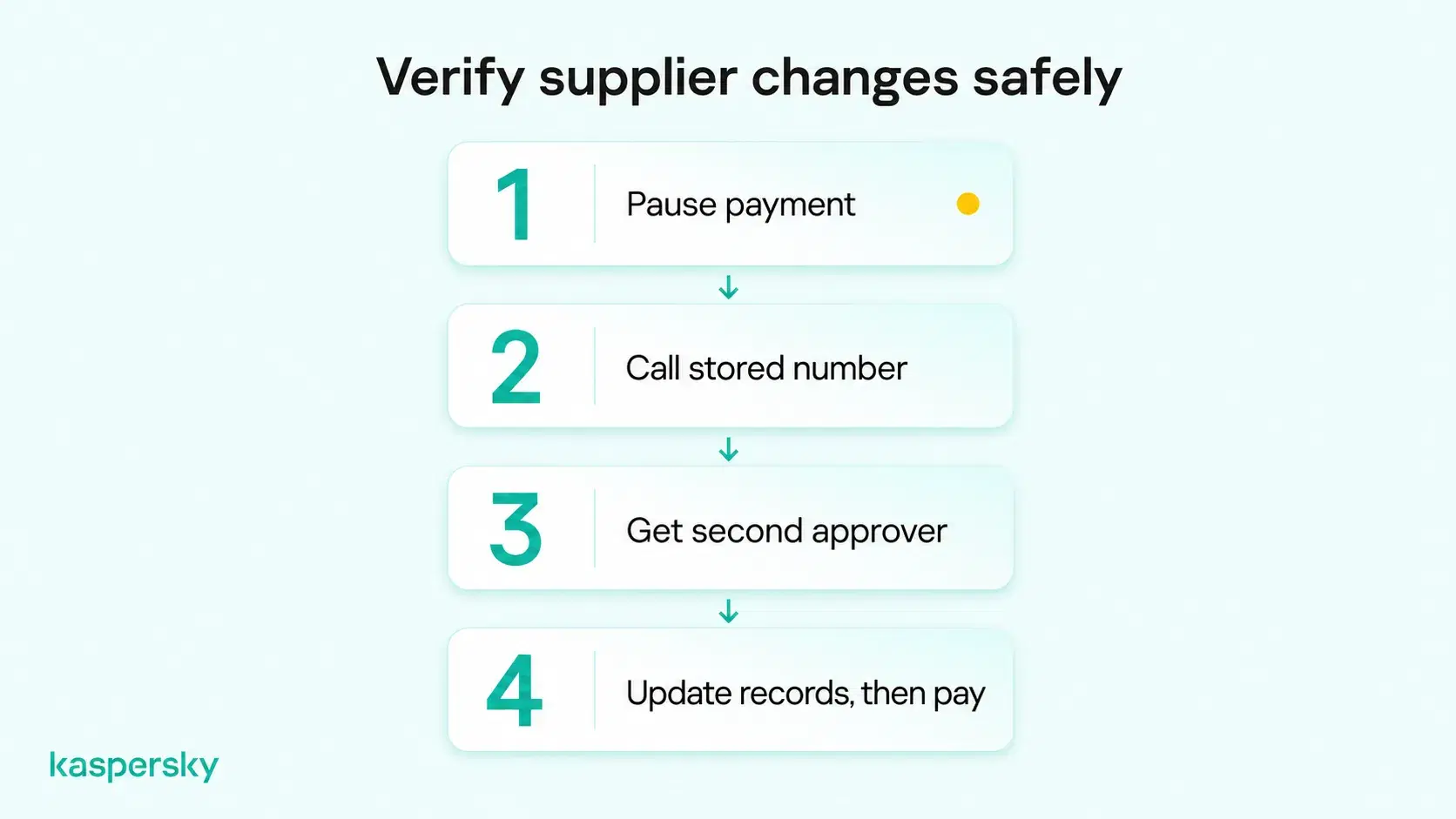
A typical example is a fraudulent supplier invoice. An attacker may impersonate a known supplier and send what looks like a genuine invoice. But it has different bank details. If the change is not verified independently, the business may send money directly to the attacker.
Malware and ransomware
Malware can steal information, monitor activity, or give attackers unauthorized access to devices. Ransomware can encrypt business files and disrupt operations. Some ransomware attacks also involve stealing sensitive information and threatening to publish it unless a ransom is paid.
Compromised credentials
Weak or compromised passwords can give attackers access to business email as well as a variety of other accounts. Once inside, they may read messages, impersonate employees, or use trusted accounts to target customers and suppliers.
Software vulnerabilities
Unpatched applications and insecure remote-access tools can create entry points into business systems. Keeping software supported and updated helps close known weaknesses before attackers can exploit them.
What happens when a small business gets hacked?
A successful cyberattack can cost a small business money, interrupt daily operations, expose sensitive information, and damage customer trust. The impact can be particularly serious for companies with limited financial reserves or resources to recover quickly.
Financial losses are usually the first consideration. Costs can come from fraudulent payments, recovery work, lost business, replacement systems, or extortion demands. These costs can be difficult to absorb for many small businesses.
Operational disruption can be particularly difficult for small businesses. If essential accounts, files, payment systems, or cloud services become unavailable, everyday operations may stop. Without dedicated IT support, restoring access and resuming normal business activities can take additional time.
Cyberattacks can also result in data breaches that expose customer, employee, or confidential business information. Depending on the data involved and applicable laws, businesses may need to investigate the incident, notify affected parties, or report the breach to relevant authorities.
Customers and business partners may lose confidence in a business if sensitive information is exposed or services are disrupted. This can be especially damaging for small businesses that depend heavily on repeat customers and long-term relationships.
How can small businesses protect themselves from hackers?
Small businesses can reduce cyberattack risks by securing accounts with strong passwords and MFA, keeping devices updated, using endpoint protection, and training employees to recognize social engineering. Regular backups and clear incident reporting procedures provide additional protection.
Secure business accounts. Use strong and unique passwords for business accounts and store them in a reputable password manager rather than reusing credentials.
Multi-factor authentication (MFA) should also be enabled for important accounts such as email, cloud platforms, financial services, and administrator accounts. Employees should only have access to the systems and information they need for their role.
Protect devices and software. Business laptops, phones, and other devices should receive security updates promptly. Reliable endpoint protection can also help detect and block malware, ransomware, malicious websites, and other threats. Old or unsupported software should be replaced where possible when it provides access to important company systems.
Independently tested and awarded by the industry's leading labs.



Employees should know how to recognize phishing and unusual payment requests. Businesses should also create simple verification procedures so staff do not have to rely on an email or message being genuine.
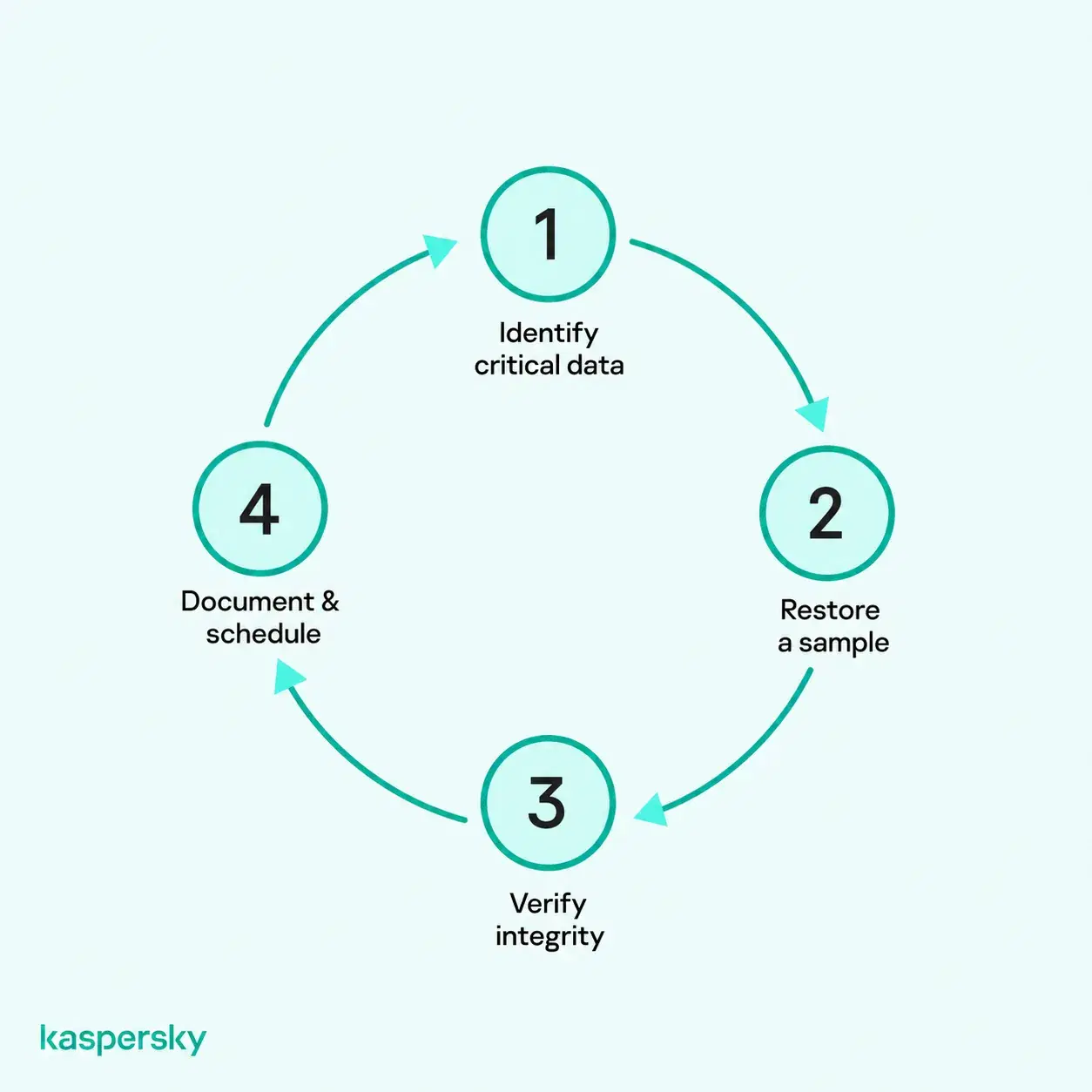
Prepare for potential security incidents. Keep secure backups of important business data and test them periodically to make sure information can actually be restored. Employees should also know who to contact if they receive a suspicious message, lose a device, or think an account has been compromised.
Related Articles:
- What are scam websites and how to avoid scam websites?
- What Malware needs to thrive
- How to avoid data theft
- Why is small business cyber security critical for your protection?
Related Products:
FAQs
Can hackers attack a small business that has no website?
Yes. A website is only one possible entry point. Attackers can target business email, cloud accounts, employee devices, remote-access services, passwords, and suppliers even if the company has no public website.
How can a small business tell if hackers have gained access to its systems?
Warning signs can include unfamiliar login alerts, unexpected password changes, new forwarding rules in email, unusual payments, unknown software, or devices behaving differently. Security software and account activity logs can also help identify suspicious access.
Who is responsible for cloud security?
Cloud security is usually a shared responsibility between the provider and the business using the service. The provider typically protects the underlying cloud infrastructure, while the customer remains responsible for areas such as account security, access permissions, configurations, and the data it stores. The exact split depends on the cloud service being used.
Which industries are most commonly targeted by cyberattacks?
According to Verizon's 2026 Data Breach Investigations Report, manufacturing, professional services, public administration, healthcare, and finance recorded some of the highest numbers of confirmed data breaches. However, businesses across all industries and sizes face cyberattack risks.


