You mention running shoes to a friend, put your phone down, and within the hour a running shoe ad appears on Instagram. It feels too accurate to be a coincidence.
Millions of people have had this experience, and most assume their phone is listening. The short answer is no, not in the way you think. The full answer is more unsettling: your phone doesn't need to listen.
What you need to know:
- Your phone is not recording everyday conversations; voice assistants only listen for specific wake words.
- Targeted ads feel eerily accurate because platforms build detailed profiles from your browsing, location, and app activity.
- Some apps collect far more data than their function requires, which is a legitimate privacy concern even without covert recording.
- Spyware such as Pegasus can activate a microphone remotely, but these attacks target specific individuals, not general consumers.
- Data brokers such as Acxiom and LiveRamp compile behavioral profiles that follow you across devices. That is the real everyday privacy risk.
- Resetting your advertising ID, reviewing app permissions, and using a VPN meaningfully reduce your exposure.
Is your phone listening to your conversations?
No. Your phone does not continuously record everyday conversations for advertisers. Neither iOS nor Android permits apps to stream microphone audio in the background, and both require user permission before any app can access the microphone at all.
But do phones listen to you when you use voice assistants? Yes, phones listen for a narrow set of wake words, usually "Hey Siri," "OK Google," or "Alexa." These triggers are processed on the device using a small, dedicated neural chip. Audio goes to the cloud only after the wake word fires. Outside that window, the microphone is not active in any meaningful sense for the apps on your phone.
Researchers at Northeastern University ran a controlled study monitoring network traffic from thousands of popular apps and found no evidence of apps secretly recording audio and transmitting it. The conclusion held even for apps widely suspected of listening. The sensation that makes you question ‘is my phone listening to me’ has a different explanation entirely.
Why it feels like your phone is listening
The human brain is wired to notice patterns and assign cause. Thus, when you talk with a friend about a product, and then see an ad for the product on your social media feed, it feels significant.
There are two cognitive effects at play here. The first is frequency illusion (sometimes called the Baader-Meinhof phenomenon) which means that once something enters your awareness, you start noticing it everywhere.
The second is confirmation bias, which means you remember the times an ad matched a conversation and forget the hundreds of ads that had no connection to anything you discussed.
Advertising platforms do not need to record you to show relevant ads. They already know a great deal about you, and they can infer the rest from the people around you.
How is my phone listening to me without recording everything?
Voice assistants run locally on a dedicated processor, doing a similar level of computational work as autocorrect. They listen in tiny bursts, discarding each one if the wake word is absent.
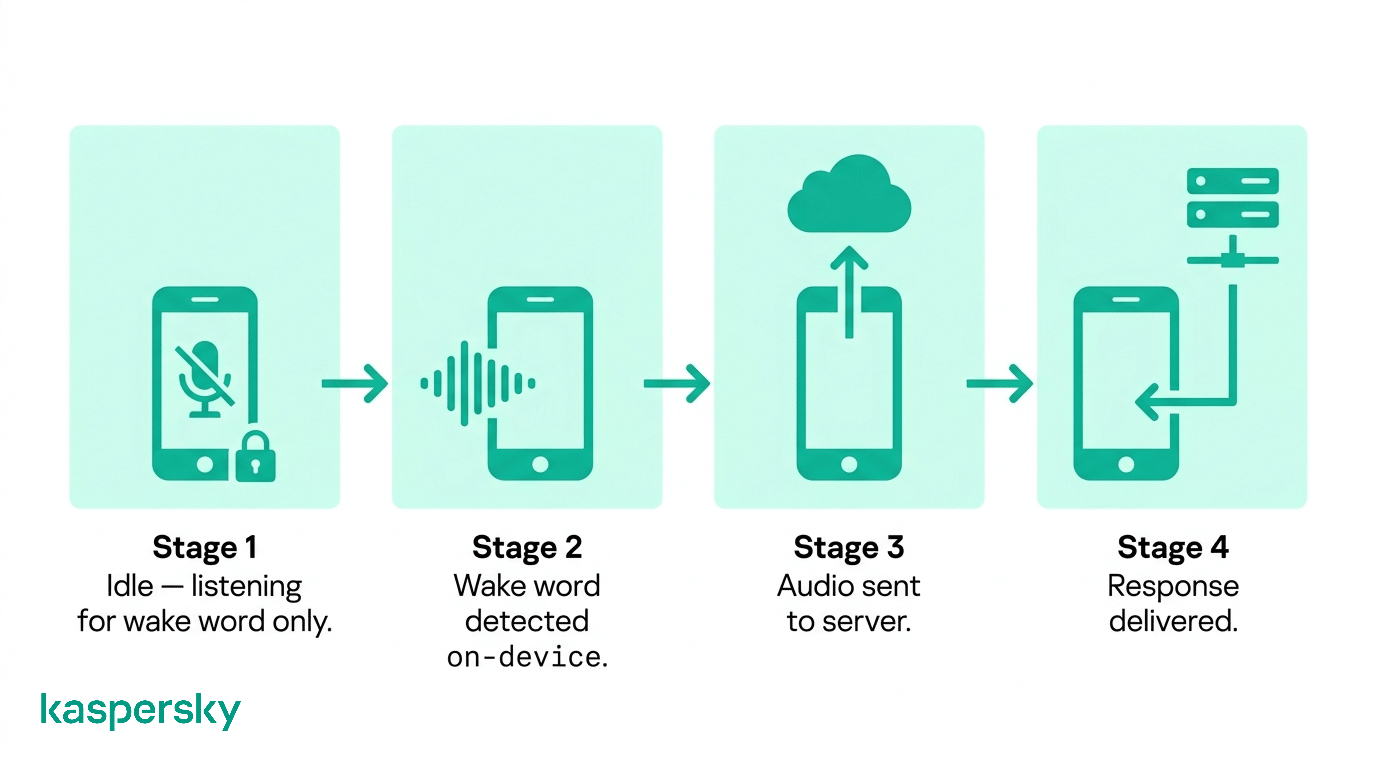 This design serves two purposes. It preserves battery life: full audio processing on the main processor would drain a modern smartphone within hours. And it also limits exposure, since no audio leaves the device until you speak the wake word.
What happens when your phone is activated
After a wake word is detected, your device records your request and sends it to a server for processing. Both Apple and Google store a transcript of each request by default. You can review and delete this history in your account settings:
- Android: myaccount.google.com
- iOS: Settings, then Siri and Search
False triggers are common where a word that sounds like "Hey Siri" in a TV program you’re watching can activate the assistant and send a short audio clip to the server. It is a limitation of how wake-word models work, not evidence of surveillance. Either way, deleting your voice history periodically is worth doing.
If your phone isn't recording you, how does your phone listen to you for ads?
Advertising platforms have built prediction systems so precisely that they often infer what you want before you have consciously decided to buy it. The mechanism is data, not audio. Platforms track your behavior, model it statistically, and cross-reference it against millions of users with similar patterns.
Every platform holds a shadow profile on you. It’s a picture of your habits, interests, and likely next purchase that you never sat down to create. The data that builds it comes from sources most people don't think of as surveillance.
What data is used to build your profile
Every app on your phone can observe your behavior inside that app, depending on its permissions, including browsing history, search queries, and the content you engage with on social platforms. Each time you make a purchase, that transaction may be shared with advertising networks through third-party cookies or software development kits embedded in retail apps.
Your advertising ID (called IDFA on iOS and GAID on Android) is a unique identifier tied to your device. It allows advertisers to link your activity across different apps and websites, even when you are not logged in. Data brokers purchase this data from app developers, enrich it with offline purchase data, and sell consolidated profiles to advertisers.
Contact syncing adds another layer to your profile. When an app asks to access your contacts and you agree, it can match your social graph against its existing database. For example, if your friends or family have searched for running shoes, the platform may infer that you have an interest in them too.
How your environment and devices influence ads
Your location history tells advertisers where you shop, eat, and exercise. With Wi-Fi probe data, your visit to a store can be tracked, even if you don’t connect to their network. This is because your phone broadcasts its MAC address when searching for known networks, and retailers use sensors to capture that signal.
Cross-device tracking connects your phone, laptop, and smart TV into a single identity. Platforms use your IP address, login credentials, and device fingerprints to link sessions. An ad campaign can reach you on your phone in the morning and your laptop in the afternoon, adjusting frequency so it does not feel repetitive.
Co-location is another, subtler, mechanism that influences that ads you’re served. If you spend time near someone who has been researching a product, advertising platforms can detect the shared location signal and infer a social connection. In that way, the interests that a friend has become a signal for what you might want.
Why it feels like spying (but isn't)
Advertising systems are optimized for relevance, which means they serve you ads of products and services you are statistically likely to want. When a relevant ad appears, it feels targeted. When irrelevant ads appear (which is most of the time), you scroll past without even noticing them.
The effect is amplified by recency. You are more likely to notice an ad for something you discussed or thought about recently, because that topic is active in your working memory. The system did not read your mind. It made a probabilistic guess that happened to match what you were talking about.
Can your phone or apps listen to you without permission?
On modern versions of iOS and Android, apps cannot access the microphone without your explicit consent. These permissions are enforced at the operating system level making them very difficult to bypass.
The issue is, most people grant permissions during installation without reading them, then never revisit the decision. An app you gave microphone access to two years ago almost certainly still has it, even if the original reason is no longer relevant.
How app permissions actually work
On iOS, every app must declare why it needs each sensitive permission, and you see a plain-language prompt before access is granted. Since iOS 14, an orange dot in the status bar lights up whenever the microphone is active; green means the camera.
Android 12 introduced the same indicators. Both platforms also include a privacy dashboard where you can see exactly which apps have accessed which sensors, and when.
Background microphone access is restricted. Apps can only use the microphone in the background if the user has granted explicit background permission, which is rare for most app categories. A shopping app that requests background microphone access should be questioned.
How everyday apps can misuse permissions
The risk is less about covert listening and more about data collection that goes well beyond what an app's function requires. A free flashlight app that requests microphone and location access has no legitimate reason for those permissions. Over-permissioned apps are common on both platforms, and their excess data collection feeds the same broker networks described above.
Sideloaded apps present a higher risk. Apps installed outside the official App Store or Google Play have not passed a security review. Some are designed specifically to harvest data or, in more severe cases, to deploy malware. On Android, sideloading is possible by default; iOS requires either developer mode or a jailbreak. If you only download app from official app stores, you reduce your risk significantly.
What are the real security risks beyond ads?
Being tracked for advertising is annoying but it’s not personal. The threats in this section are different: they are targeted at the individual and some of them have been used against journalists and lawyers.
How spyware can access your microphone
Pegasus, developed by the Israeli firm NSO Group, is the most well-known example of commercial spyware capable of remotely activating a smartphone's microphone and camera. It exploits zero-day vulnerabilities in iOS and Android to install itself without user interaction. Journalists, lawyers, activists, and political figures have been confirmed targets, based on forensic analysis by Amnesty International's Security Lab.
This category of threat is serious, but an ordinary consumer is unlikely to be targeted like this. Pegasus costs millions of dollars per deployment and is sold exclusively to governments. If you are concerned about state-level surveillance because of your profession or activism, the Electronic Frontier Foundation provides guidance on threat management for high-risk individuals.
Take control of your phone's privacy
Your phone holds more personal data than most people realize. Kaspersky Mobile Security blocks malware and phishing, masks your connection with a superfast VPN, and checks whether your data has been exposed in a breach.
Try Kaspersky Mobile SecurityHow apps can collect more data than you expect
Screen-recording SDKs (Software Development Kits), sometimes called session replay tools, can capture everything on your screen during an app session. This includes the text you type, forms you fill in, and content you view. A 2018 investigation by researchers at Princeton found session replay code in apps from major retailers and airlines, and it was not disclosed to their users. Using SDKs is not illegal in most jurisdictions, but it exceeds what most people think they consented to.
Apps can also log your keystrokes, read your clipboard, track the physical way you hold and scroll your phone. None of this requires microphone access, and almost none of it is clearly explained in the small print.
Why data tracking is the bigger everyday risk
You have probably never heard of Acxiom, but it holds a profile on you. The company claims over 2.5 billion consumer records worldwide. LiveRamp does something similar. It connects your loyalty card purchases and clinic visits to the advertising ID on your phone. This means an ad platform can know that you visited a clinic of a particular specialty without that clinic sharing anything directly. In most jurisdictions under marketing law this is legal, requiring only disclosure buried in privacy policies.
The profile built on your behavior doesn't stay in the ad world. Phishing campaigns use profiled data to personalize their attacks. This makes fake emails and texts harder to identify as fraudulent because they use relevant broker data such as insurance pricing, credit scoring, and employment screening as part of the scam.
How can you protect your privacy on your phone?
The steps below take under an hour and require no technical expertise. They will not make you invisible, but they will go a long way to making it harder to build a detailed profile on you.
Control microphone and app permissions
Start with a permission audit
iOS: go to Settings, then Privacy and Security, then Microphone. This lists every app with microphone access. Revoke access for any app that does not have a clear audio function.
Android: go to Settings, then Privacy, then Permission Manager, then Microphone for the same view.
Review what your apps are accessing
Use the privacy dashboard on your platform to see which apps have recently accessed your microphone, camera, location, contacts, calendar and health data. A contacts list reveals your social graph; calendar data reveals your schedule and location patterns.
iOS: go to Settings, then Privacy and Security, then App Privacy Report. Contacts, Calendars, and Health each have their own section listing every app with access.
Android: go to Settings, then Privacy, then Privacy Dashboard. Also check the Permission Manager, where you can review access by permission type across all installed apps.
Check background location access separately
Many apps request "always on" location when "while using" is sufficient. Change these to "while using" or "never" unless there is a clear functional reason.
iOS: go to Settings, then Privacy and Security, then Location Services
Android: go to Settings, then Location, then App permissions
Reduce tracking and profiling
Reset your advertising ID regularly
This does not delete your existing profile, but it severs the link between future data and your history.
iOS: go to Settings, then Privacy and Security, then Tracking, then turn off "Allow Apps to Request to Track."
Android: go to Settings, then Privacy, then Ads, then "Delete advertising ID."
Limit ad personalization explicitly
Both iOS and Android offer an option to opt out of personalized advertising at the system level. Enabling this setting will not stop ads, but it stops ads from being targeted using your behavioral data.
iOS: go to Settings, then Privacy and Security, then Apple Advertising, then turn off Personalized Ads.
Android: go to Settings, then Privacy, then Ads, then "Opt out of Ads Personalization”.
Use a VPN
A VPN encrypts your internet traffic and masks your IP address from the sites and apps you use. This prevents IP-based cross-device tracking and makes it significantly harder for ad networks to link your phone sessions to your laptop sessions. It also protects your data on public Wi-Fi networks where unencrypted traffic can be intercepted.
Quick privacy checklist
- Disable microphone access for every app that does not require audio as a core function.
- Delete your Siri, Google Assistant, or Alexa voice history from your account settings at least twice a year.
- Reset your advertising ID every few months or disable ad tracking entirely.
- Keep your operating system and apps updated as software updates frequently patch the vulnerabilities that spyware exploits.
- Avoid sideloading apps from outside official stores unless you have a specific technical reason and understand the risk.
- Use a VPN on public Wi-Fi and consider using one as a general habit for sensitive browsing.
Related Articles:
- What are the different Spyware Types you should know about?
- How to stop phone hacking
- Is your Smart TV spying on you without your knowledge?
- What are the key concerns about Smart Speaker Security?
Related Products:
Frequently asked questions about phone listening
Can your phone listen to you even if you never use voice assistants?
Yes, potentially. Voice assistant software is enabled by default, so the wake-word listener may be running even if you have never used it. Check your settings and disable it if you want to be certain. Ads will find you either way through browsing history, location, and app behavior.
Does your phone listen when it's turned off or in airplane mode?
A powered-off phone cannot run software or transmit data. In airplane mode, radio transmissions are disabled, but software still runs locally. An app with microphone permission could record audio in airplane mode and upload it later when connectivity resumes. Check and remove unnecessary permissions to avoid this.
Can your phone listen to you through other devices like smart speakers or TVs?
They do not share audio with each other by default. Smart speakers and smart TVs run their own wake-word listeners independently of your phone. However, all three devices may connect to the same advertising ecosystem through your Wi-Fi and account credentials. This creates a co-location signal used for ad targeting.
Can deleting apps or resetting your phone stop targeted ads?
No, deleting an app removes it from your device but not the data it has already shared with third parties. A factory reset creates a new advertising ID and clears local data, but broker databases retain your profile. Reset combined with turning off ad personalization and using a VPN can help.


